To find a director’s companies, open their master data on MCA. It lists current and past company and LLP roles recorded against their DIN (Director Identification Number), with designations, appointment dates and cessation dates. The lookup is free; you need an MCA login.
You get there in one of two ways: from a company the director is on, or by searching the director’s name or DIN.
Download every document of a company in one go, sorted into folders.
Add to ChromeFirst two companies freeHow to find a director’s companies on MCA
- Log in to MCA and open Master Data Services. On mca.gov.in: MCA Services → Master Data → Master Data Services. You need to be logged in; MCA sends you to the login page otherwise.
- Choose Directors/Designated partners under the search box, and type the director’s name or DIN. Press Enter and solve the captcha.

The search box with Directors/Designated partners chosen. - Click the DIN in the results. A name can return more than one DIN: how to find a director’s DIN from their name.
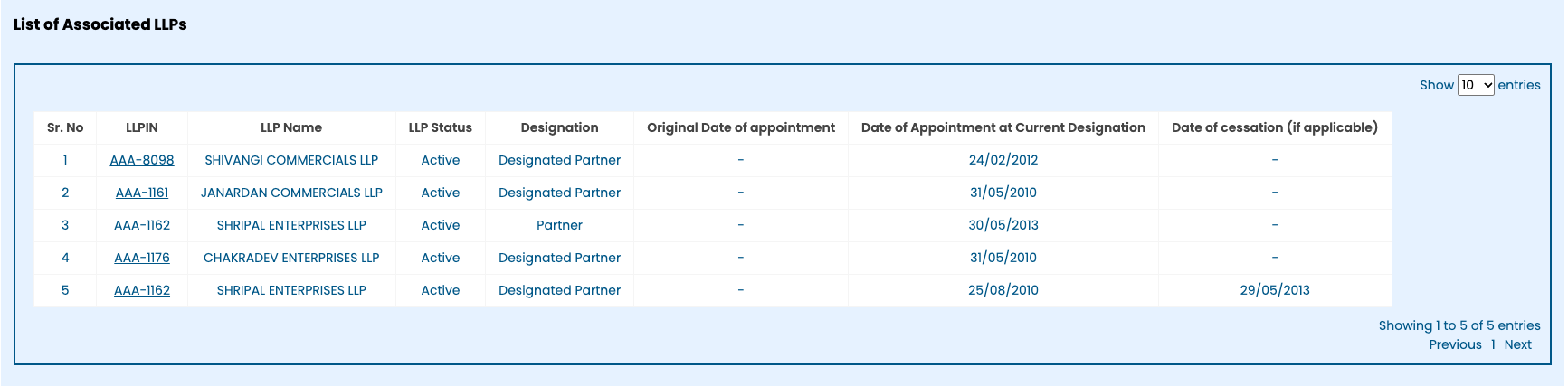
- Read the two lists: List of Associated Companies and List of Associated LLPs.
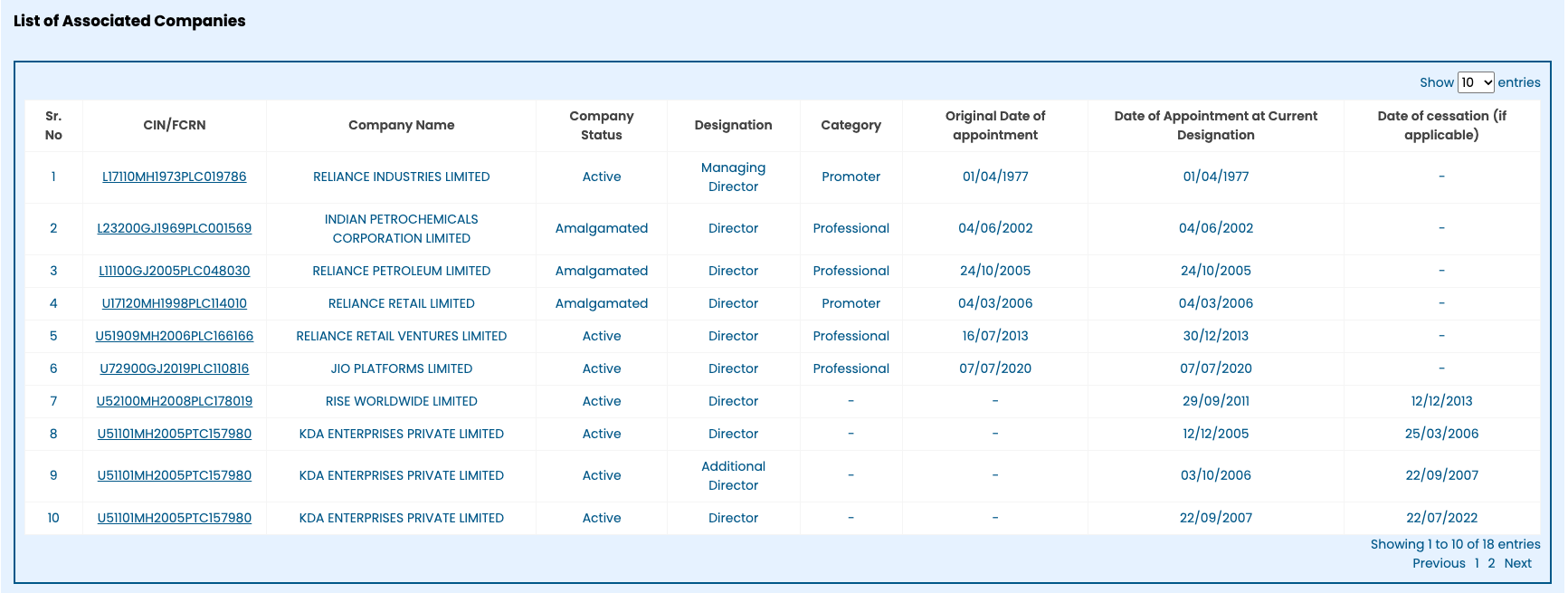
Company roles recorded against a director’s DIN. The same CIN can appear in several rows.
Download every document of a company in one go, sorted into folders.
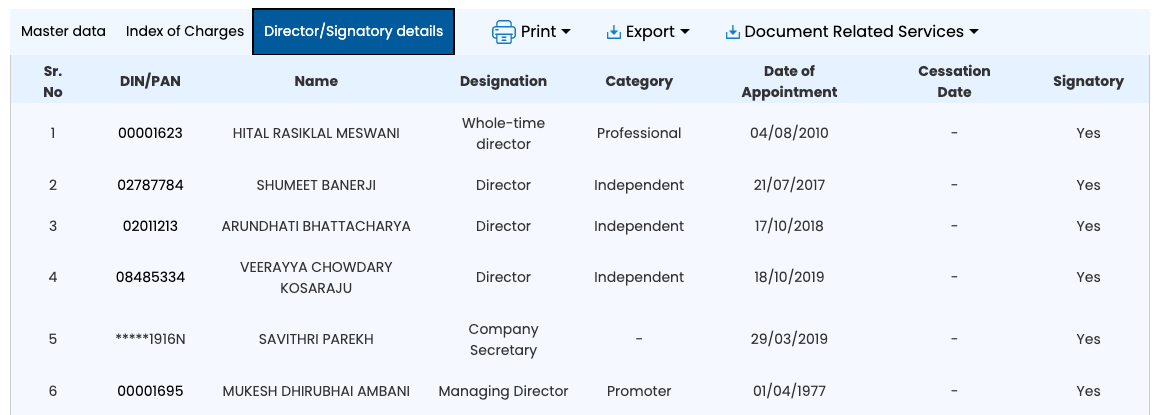
Add to ChromeFirst two companies freeAlready looking at a company? Open its master data, go to the Director/Signatory details tab and click the director’s DIN. It opens the same page, without another captcha.
How to read the list
Each company row shows the CIN, company name, company status, designation, category, original date of appointment, date of appointment at the current designation, and date of cessation.
- No cessation date: MCA shows no end date for that role. A cessation date means that row’s role ended. Check other rows for the same CIN before concluding that the director left the company.
- One company can appear more than once. Rows can show different periods or designations, such as Additional Director and Director. Count distinct CINs, not rows, and check every results page.
- Company status is the company’s, not the director’s. A director can be on a company that is Amalgamated or Strike Off. The status says what happened to the company.
- Long lists run to several pages. MCA shows 10 rows a page; the count is under the table (“Showing 1 to 10 of 18 entries”).
- LLPs are a separate list below the companies, with the LLPIN, LLP status and designation, such as Designated Partner. Count distinct LLPINs here too.
What the list does not tell you
- Shareholdings. The list records company and LLP roles, not ownership. A director can own shares in another company without being on its board. Shareholders are recorded in the company’s annual return.
- Why a role ended. The list shows when a role ended, not why.
- Other people with the same name. The list is for one DIN. Check you have the right person before drawing conclusions.
Check the companies behind the list
Once you have identified the companies, check their filed accounts and annual returns. Our guide explains how to download company and LLP documents from MCA; ROCwork helps download the public documents for each company you choose.
Download every document of a company in one go, sorted into folders.
Add to ChromeFirst two companies freeFAQ
How can I find all companies of a director?
To find a director’s companies, log in to MCA and open MCA Services → Master Data → Master Data Services. Choose Directors/Designated partners, search by name or DIN, solve the captcha and click the DIN. Read the company and LLP roles recorded against it, checking every results page.
Does the list include companies a director has left?
The list includes past company roles with cessation dates. A cessation date means that row’s role ended; it can reflect a designation change rather than departure from the company. Check other rows for the same CIN. A blank cessation date means MCA shows no end date for that role.
Is checking a director's companies on MCA free?
Checking a director’s companies on MCA is free. You need an MCA login and must solve a captcha to search, but there is no fee for the director’s master data. The filed documents of those companies are not free: they cost MCA’s ₹100 per company under View Public Documents.
Can I see a director's companies from a company's page?
You can see a director’s companies from a company’s page on MCA. Open the company’s master data, go to the Director/Signatory details tab and click the director’s DIN. It opens the company and LLP roles recorded against that DIN, with appointment and cessation dates, without another captcha.
Sources: MCA’s Master Data Services, checked on mca.gov.in. ROCwork is a product of Consara Technologies Private Limited and is not affiliated with the Ministry of Corporate Affairs.