To find a director’s DIN by name, log in to MCA and search the name in Master Data Services with Directors/Designated partners chosen. The results show names and DIN/DPIN numbers. The search is free. If several records match, check the director’s company before choosing one.
A DIN (Director Identification Number) is an eight-digit identifier, also used for designated partners of LLPs. MCA labels the result column DIN/DPIN. Keep all eight digits, including any leading zeros.
Download every document of a company in one go, sorted into folders.
Add to ChromeFirst two companies freeHow to find a DIN by name on MCA
- Log in to MCA and open Master Data Services. On mca.gov.in: MCA Services → Master Data → Master Data Services.
- Choose Directors/Designated partners under the search box. The box changes to “Enter name, DIN, DPIN”.

The search box with Directors/Designated partners chosen. - Type the name and press Enter. Solve the captcha. MCA lists each match with its name and DIN/DPIN. It matches from the start of the name: “Mukesh Dhirubhai” finds 11 directors, “Mukesh Ambani” finds none. Not sure of a middle name? Type fewer words, starting with the first name.
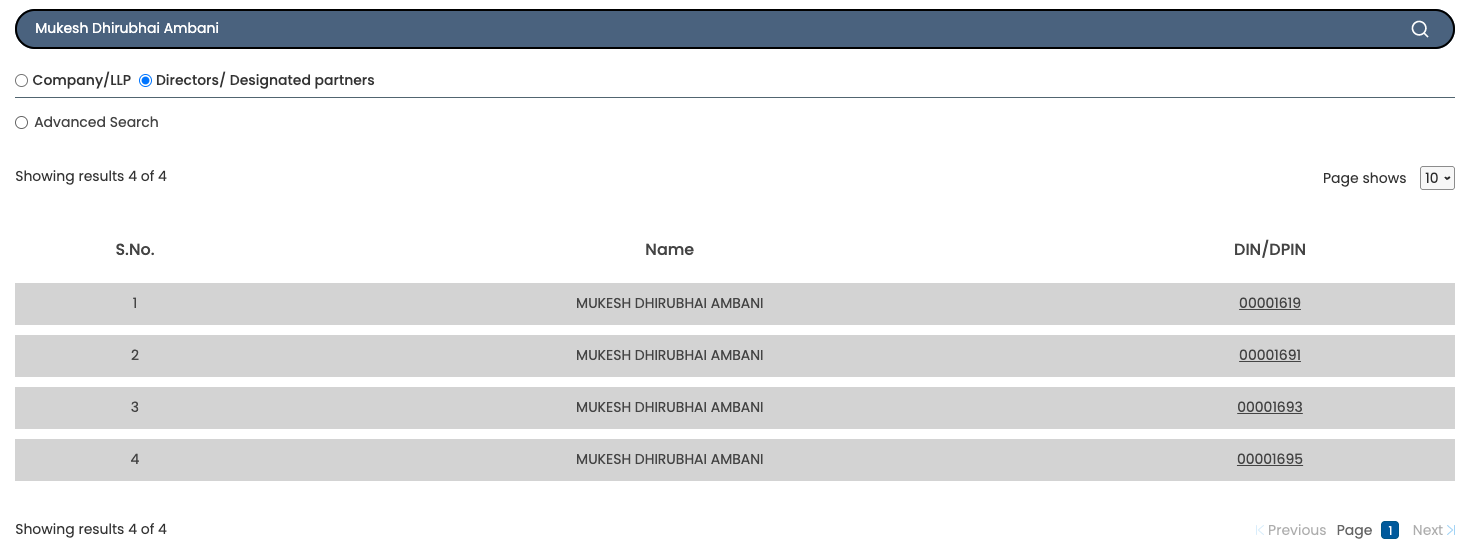
One name search returned four DIN/DPIN records. Confirm the right record before using a number. - Click a DIN to open its master data and compare the associated companies with a company you know the director is on.
Download every document of a company in one go, sorted into folders.
Add to ChromeFirst two companies freeWhen one name returns several DINs
A name search can return several DINs. Our search for “Mukesh Dhirubhai Ambani” returned four records. Opened one by one, one was Approved with company roles; the other three were Lapsed, with no companies or LLPs. The results list shows only the name and number, so the name alone does not establish which record is the person you mean.
To find the right one:
- Start from a company you know. Open its master data, go to the Director/Signatory details tab and read the DIN against the director’s name: how to check company master data on MCA.
- Compare the associations. Open a search result’s DIN and check its company list against that known company. Do not assume all matching records belong to one person.
What to check after finding the DIN
Use the DIN to find the director’s current and past company roles. To inspect those companies’ accounts and annual returns, follow how to download company and LLP documents from MCA. ROCwork helps download the public documents for each company you choose.
Download every document of a company in one go, sorted into folders.
Add to ChromeFirst two companies freeFAQ
How can I find a director's DIN by name?
To find a director’s DIN by name, log in to MCA and open MCA Services → Master Data → Master Data Services. Choose Directors/Designated partners, type the name, press Enter and solve the captcha. Read the DIN/DPIN column and confirm the record against a company you know the director is on.
Why does one name show more than one DIN?
One name can return several DIN records on MCA, but the results alone do not explain why. In our check, three of four were Lapsed with no companies. Do not assume the records belong to the same person. Read the DIN against the director’s name in a known company’s Director/Signatory details tab, then compare it with the search results.
Is DIN search on MCA free?
DIN search on MCA is free with an MCA login. Choose Directors/Designated partners in Master Data Services, search the name and solve the captcha. MCA charges nothing for the lookup or the associated company list. Access to filed company documents is separate from this free search.
What is the difference between a DIN and a DPIN?
DIN means Director Identification Number; DPIN means Designated Partner Identification Number for LLPs. MCA integrated the two, so a DIN can also be used as a DPIN. They are not separate numbers you need for the two roles. MCA’s name search displays them in one DIN/DPIN column.
Sources: MCA’s Master Data Services, checked on mca.gov.in; MCA’s circular on integrating DIN and DPIN. ROCwork is a product of Consara Technologies Private Limited and is not affiliated with the Ministry of Corporate Affairs.