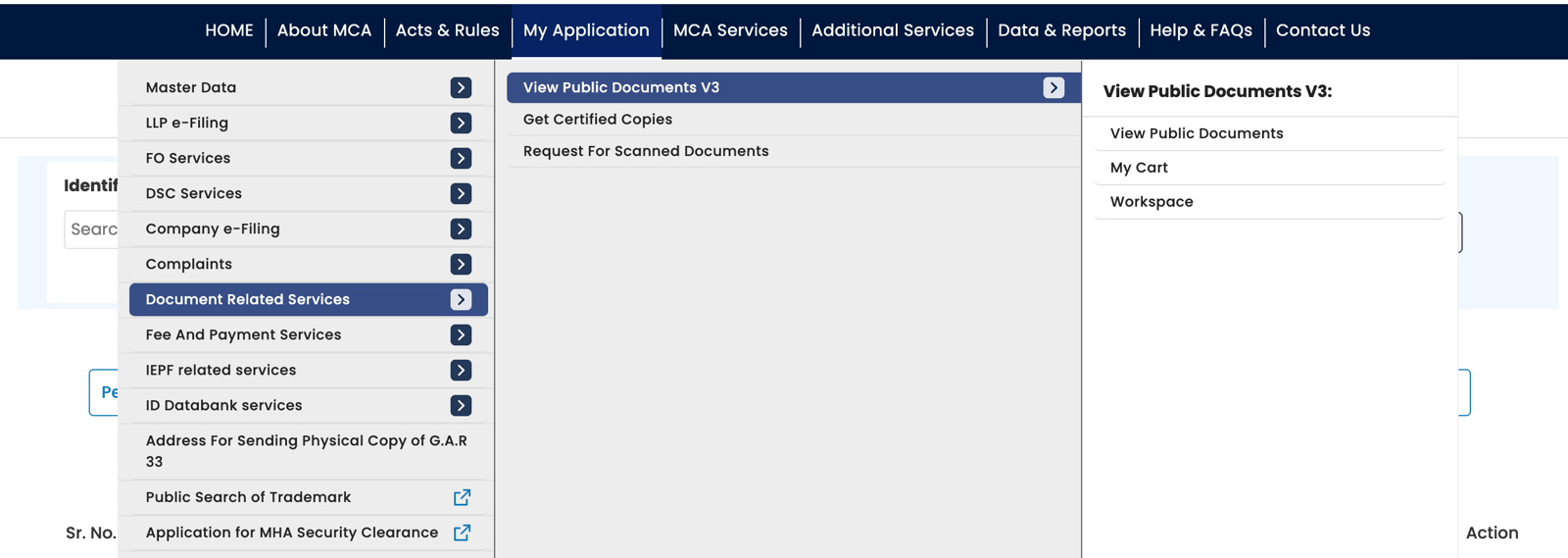
To download company documents from MCA, log in to mca.gov.in, go to MCA Services → Document Related Services → View Public Documents V3 → View Public Documents, search for the company or LLP, and pay the fee. Once MCA records your payment, open the company in your Workspace and download the required filings.
As of October 2026, the MCA fee is ₹100 per company or LLP. The manual interface lets you download five documents at a time.
Logged in to MCA as the company itself, you can download its certificates and receipts free, but not its filed forms: see what your own company gets free.
For a few filings, that is manageable. For hundreds, you have to track each batch, extract the zips, and check whether anything was missed. This guide explains the process and how ROCwork handles that repetitive work.
Portal timings and limits below are based on our MCA V3 tests between 22 and 25 September 2026. Actual behaviour may vary.
Download every document of a company in one go, sorted into folders.
Add to ChromeFirst two companies freeHow to download company or LLP documents from MCA V3
Before you start, have your MCA login, the company’s name or CIN (for an LLP, its LLPIN) and a payment method ready. A free Registered User account is enough for this process. If you need one, follow our guide to creating an MCA login ID.
Pick a quiet time if you can. In our runs, MCA failed most often between 3 PM and 8 PM IST.
1. Log in to MCA
Open mca.gov.in, click Sign In / Sign Up, and enter your user ID, password and captcha. Complete the email OTP step if prompted.
2. Open View Public Documents
Go to MCA Services → Document Related Services → View Public Documents V3 → View Public Documents.
3. Search for the company and pay
Search using the company’s name or CIN (Corporate Identification Number), or an LLP’s name or LLPIN (LLP Identification Number), and add it to your request. MCA generates an SRN (Service Request Number).
Complete the ₹100 payment. In our tests, MCA redirected us to Bharatkosh for payment.
4. Open the paid company in your Workspace
Once MCA records the payment, the company appears in your View Public Documents Workspace. Open it to access the document selection screen.
5. Choose the years and category
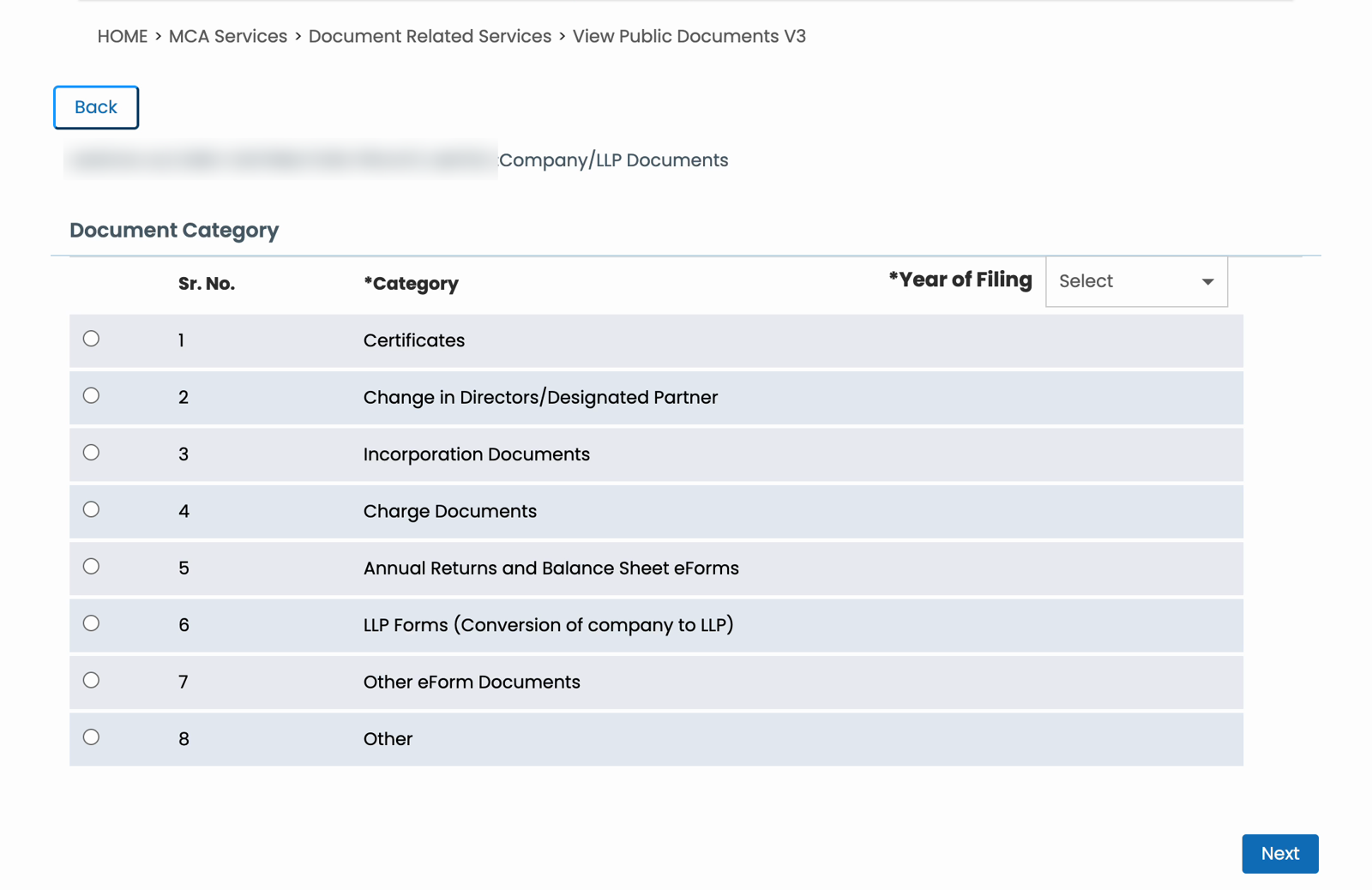
Select the years you need, choose a document category, and click Next.
MCA has eight categories: Certificates, Change in Directors, Incorporation Documents, Charge Documents, Annual Returns and Balance Sheet eForms, LLP Forms, Other eForm Documents, and Other.
6. Select five documents and download
Select up to five rows, click Download, enter the captcha, and submit. MCA delivers the selected documents in a zip, usually about a minute later.
Open the zip and check that it contains the files you selected.
7. Repeat, extract and check
Wait until the Download button is available again, then select the next batch. Continue through the list and repeat for the other categories.
Extract the zips and compare the saved files with MCA’s document list. Keep a simple record of completed batches, especially if you have to pause or retry a download.
How to view public documents on MCA after paying fees
After payment, return to View Public Documents V3 → Workspace. Your paid company should appear there with its SRN. You do not need to search and pay again to open the same request.
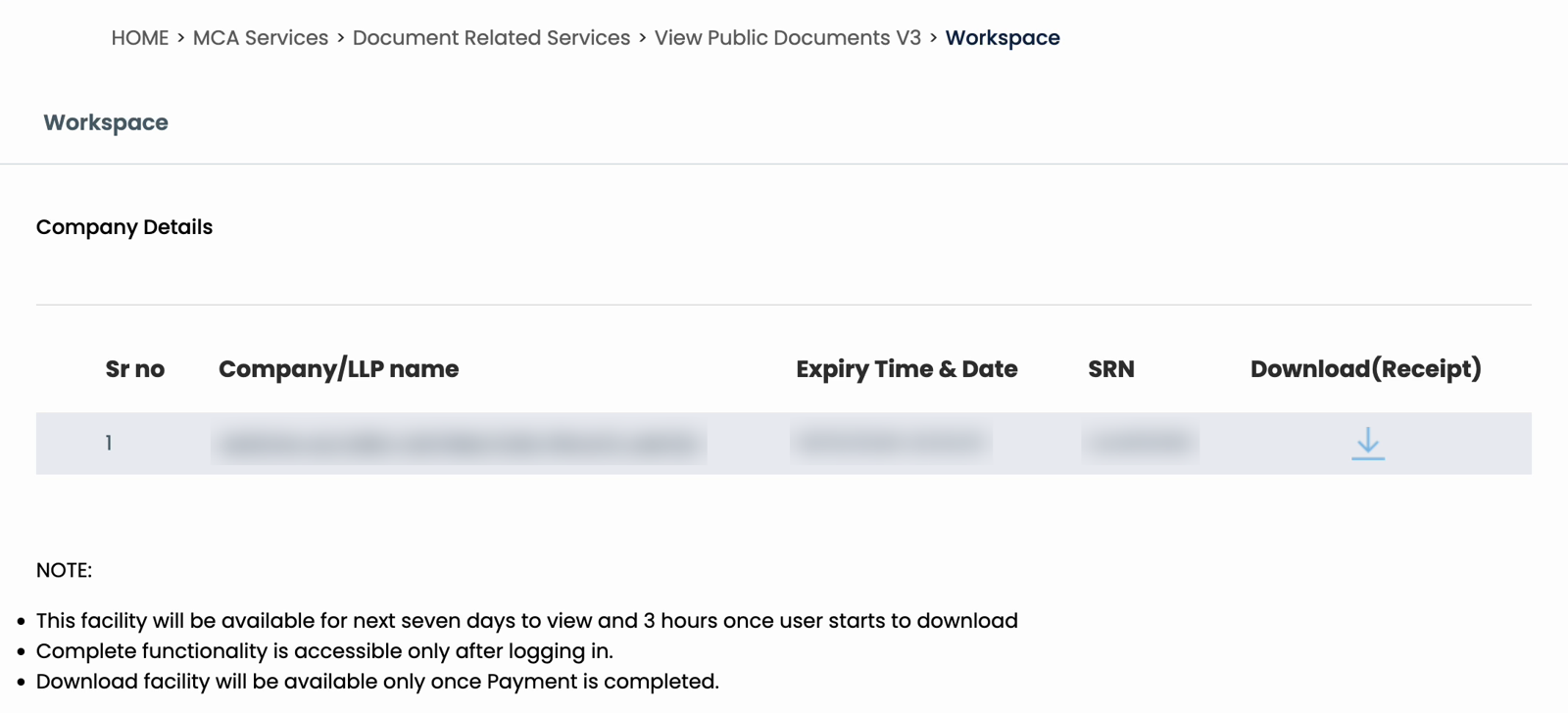
If the company is missing, check whether MCA has recorded your payment.
In our tests, payment confirmation took 30 minutes to an hour, even after the bank had debited the money. On 23 September 2026, a card payment made at 13:09 IST showed on MCA at 13:38. Allow time for confirmation before making another payment. MCA accepted duplicate payments in our runs, generating a separate SRN and another charge.
What your own company can download from MCA for free
Logged in to MCA as the company, you can download its certificates, letters and receipts free. Its filed forms are not there.
- Log in to MCA with the company’s own user ID, which is its CIN (an LLP’s is its LLPIN), not your personal login. No login yet? How to create your company’s MCA login.
- Open My Application.
- Certificates/Letters has documents such as the certificate of incorporation and the directors’ DIN approval letters. Click Download on a row.
- Challans/Receipts has the receipts for the company’s payments to MCA.
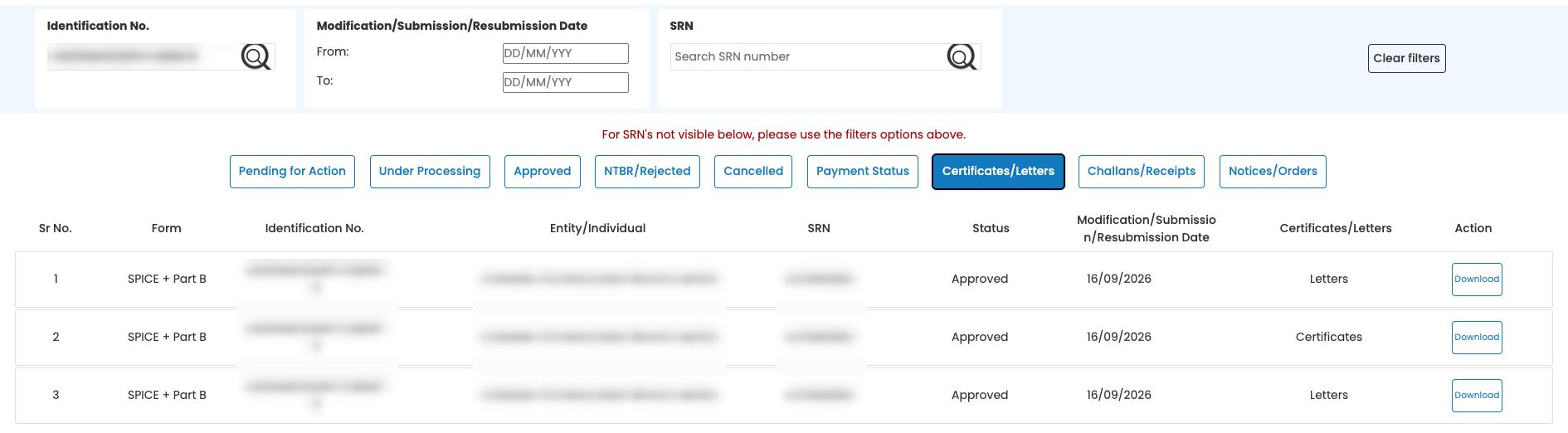
The filed forms, such as AOC-4 or MGT-7, and their attachments are not in the company’s login. MCA lists a form under Approved only for the login it was filed from, usually your company secretary’s or a director’s. For the full set, use View Public Documents and pay MCA’s ₹100.
Five documents at a time means keeping track of every batch
A company with 700 documents needs at least 140 five-document downloads. Separate categories and failed batches can add more.
The clicks are only part of the work. You also have to:
- Remember which five documents you downloaded last.
- Select the next five without repeating or skipping rows.
- Extract all the downloaded zips.
- Check whether every selected document actually arrived.
If you get interrupted, you have to find your place again. If a zip is broken, you have to return to the affected rows. At the end, you may have hundreds of PDFs and still wonder whether you missed a file.
For CS professionals, lawyers and CAs, this is time spent preparing the records before reviewing them.
We built ROCwork to handle the downloading, extraction and organisation.
MCA documents download time: how long does it take?
The number of batches and the wait between them make a large difference.
In our tests, each zip took about 62 seconds to arrive, whatever its size. After each batch, MCA’s Download button then stayed locked for approximately 80 seconds. Using that observed lock:
| Documents | Five-document batches | Approximate waiting time alone |
|---|---|---|
| 100 | 20 | 27 minutes |
| 300 | 60 | 1 hour 20 minutes |
| 700 | 140 | 3 hours 7 minutes |
These are estimates based on an 80-second wait per batch. Selecting documents, entering captchas, checking files and extracting zips take additional time.
A large manual download can therefore run into MCA’s access window before you finish.
How to download all MCA documents with ROCwork
ROCwork is a Chrome extension that works from your logged-in MCA tab. You log in and pay MCA yourself. Once the payment is recorded, the company appears in the ROCwork panel.
To start:
- Open the company in ROCwork.
- Review the documents by category and year.
- Untick anything you do not need.
- Choose a folder and press Download.
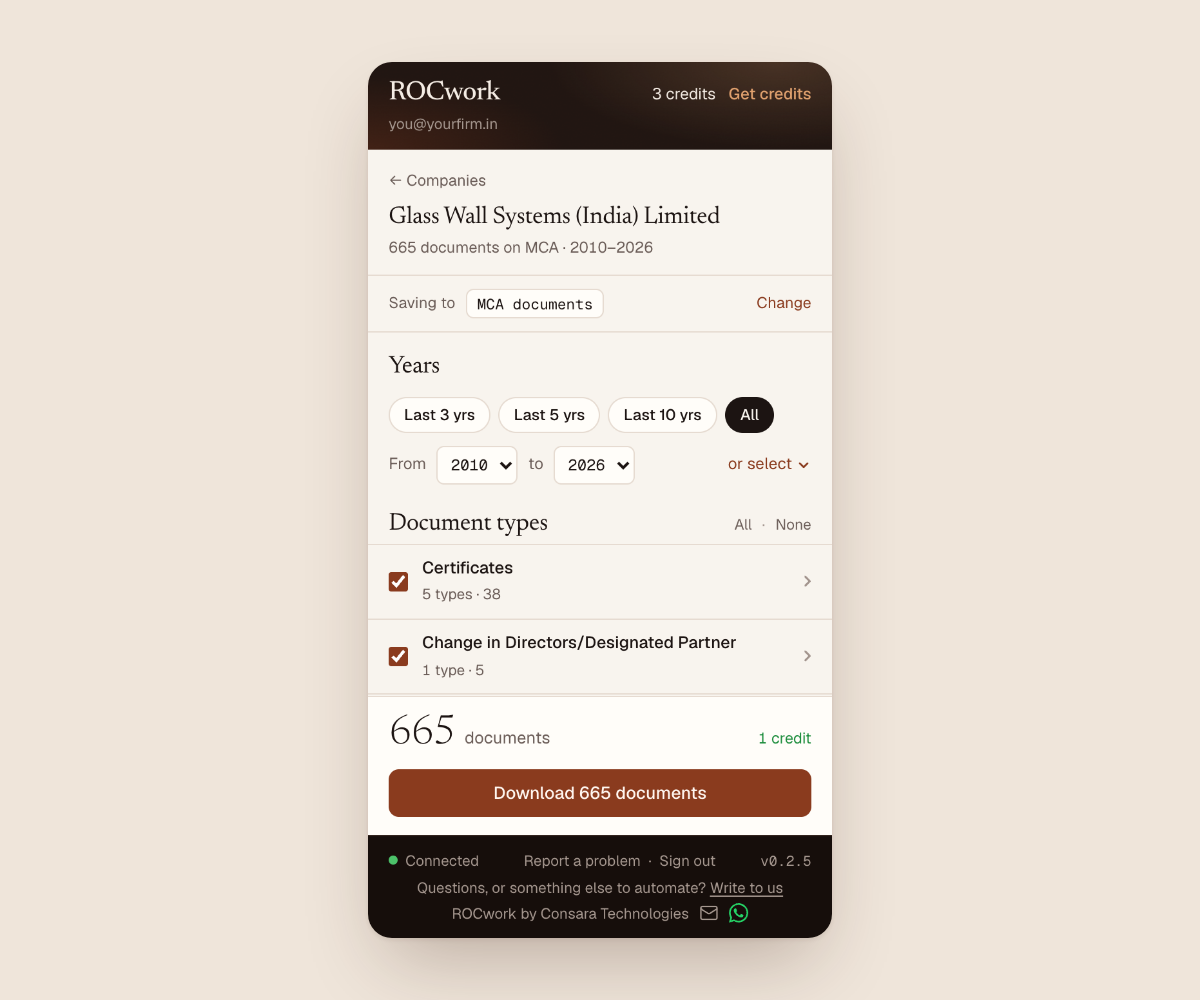
Viewing the document list is free. A credit is used when you start downloading.
ROCwork runs seven batches at a time, checks the downloaded zips and retries broken batches. It extracts the files into a company folder, sorts them by category, and creates an Excel index.
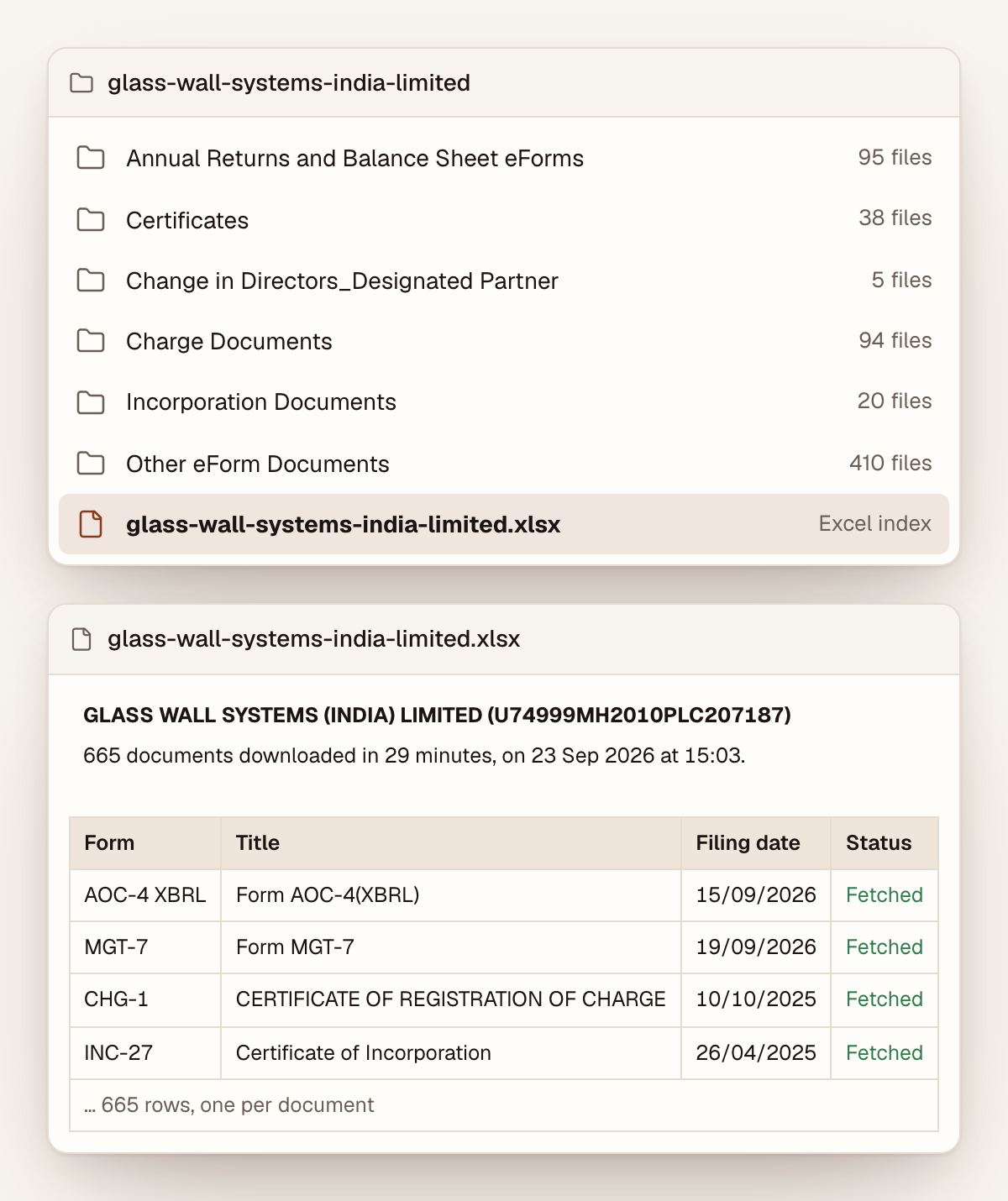
You get organised documents and a record to review, without manually tracking each five-document batch or extracting each zip.
In our test on 25 September 2026, ROCwork saved 750 documents in 27 minutes. Download time varies with the documents and MCA’s response.
Cost and access
ROCwork costs ₹50 for one company’s download run from one MCA payment, or ₹40 a company in a pack of 15. MCA’s ₹100 fee is separate. Your first two credits are free, once per MCA login ID.
Keep the MCA tab and the ROCwork panel open until the download finishes.
MCA download limits to plan around
After you pay MCA, you have up to 7 days to start downloading that company’s documents. Your first document download starts a 3-hour window. After the 3-hour window, you cannot download any more documents for that company, even if some of the 7 days are left. To download more, you pay MCA ₹100 again.
Up to approximately 750 documents per user per day, across any number of companies you pay for. This is MCA’s own limit. Fewer on a bad MCA day. For more documents, try again the next day.
We hit that limit before the window ended. On 22 September 2026, MCA stopped a payment after about 800 document requests; on 25 September 2026, after 832. Both times the message was “Entitlement check failed”.
Do not treat those results as a guaranteed allowance. Plan around approximately 750 documents per user per day, with fewer usable files possible when downloads fail.
Failed downloads and retries consumed the allowance in our tests. Requesting the same five documents twice counted as ten requests.
For larger companies, prioritise the years and categories you need. For more documents, try again the next day with another MCA payment.
MCA View Public Documents not working: what to check
| Problem | What to check or do |
|---|---|
| “Captcha is expired” on the MCA search | Your captcha was not wrong: MCA sometimes refuses the search that follows a correct captcha, about one try in three on some days. Click Submit twice. |
| Company missing after payment | Check the payment status and allow up to an hour for MCA to record it. |
| Bharatkosh shows an error before taking money | This happened to us on 23 and 25 September 2026. The company then sat in the cart as “Payment incomplete”. Try again later. |
| Empty zip or a zip that will not open | On 25 September 2026, 31 of 198 zips were broken on the first try. Retry the affected batch; the second try almost always worked. Retries may consume the allowance. |
| Selected document missing from the zip | Compare the contents with the selected rows. Record anything still missing after a retry. |
| Session expired or authorisation error | Log in again, return to the Workspace, and check where your download stopped. |
| “Entitlement check failed” | Check whether the time or usage limit has been reached. Another payment may be needed. |
A successful browser download does not prove that every requested document arrived. Check the files themselves before marking a batch complete.
Download every document of a company in one go, sorted into folders.
Add to ChromeFirst two companies freeFAQ
How much does MCA charge to view a company's documents?
MCA charges ₹100 per company or LLP to view and download its public documents through View Public Documents, as of October 2026. One payment covers every category and every year. You have up to 7 days to start. Your first document download starts a 3-hour window, and after it you cannot download more without paying again.
Can I download MCA documents for free?
MCA does not offer another company’s documents for free: View Public Documents charges ₹100 per company or LLP, as of October 2026. For your own company, its MCA login gives its certificates and receipts free under My Application, but not its filed forms. ROCwork’s first two credits are free, but MCA’s ₹100 still applies.
Can I download MCA documents without an MCA login ID?
Not on MCA itself: View Public Documents needs an MCA login, and making one is free (how to make an MCA login ID). If you’d rather not, ROCwork’s done-for-you service downloads the last 3 years of a company’s documents for ₹499, MCA’s fee included.
Which website should I use to download MCA documents?
The official website for downloading MCA documents is mca.gov.in, the Ministry of Corporate Affairs portal. Log in and use View Public Documents under MCA Services to pay for and open a company’s filings. ROCwork is a Chrome extension that automates the downloading from your own logged-in mca.gov.in tab.
How long do I have to download MCA documents after payment?
After paying MCA, you have up to 7 days to start downloading a company’s documents. Your first document download starts a 3-hour window. After the 3-hour window, you cannot download any more documents for that company. MCA’s own limit of approximately 750 documents per user per day can end it sooner. Files you saved stay with you.
Can I download LLP documents from MCA?
LLP documents download from MCA the same way as a company’s: search View Public Documents by the LLP’s name or LLPIN, pay MCA’s ₹100, then choose the categories and years you need. ROCwork works for LLPs too, with the LLPIN in place of the CIN.
Why are some old MCA documents listed as .oct files?
MCA lists some old filings, such as Form 20B, Form 23AC and CHG-1s from 2011 to 2016, with the file type “oct”. In our downloads, every one arrived inside the zip as an ordinary PDF that opens normally, so no converter is needed. If one will not open, download that batch again.
Why does MCA download only 5 documents at a time?
MCA’s View Public Documents page caps each download at five documents, and MCA’s server refuses a request for more. Each batch also needs a captcha, and the Download button locks for about 80 seconds afterwards. A 700-document company therefore takes 140 separate downloads by hand.
How many documents can I download from MCA in a day?
Up to approximately 750 documents per user per day, across any number of companies you pay for. This is MCA’s own limit. Fewer on a bad MCA day, and failed downloads and retries count too. For more documents, try again the next day.
Can I download only selected documents from MCA?
Yes. On MCA you can download only the documents you need: choose the years and one category, then tick up to five rows per download. In ROCwork, you see every document by category and year first, untick what you do not need, and only the rest is downloaded.
How do I check whether I missed any MCA documents?
To check for missed MCA documents, compare your saved files with MCA’s list for the categories and years you chose. Open each zip rather than counting downloads, because a zip can arrive empty or broken. ROCwork’s category folders and Excel index list every saved document, which makes the check quicker.
How do I download a company's balance sheet from MCA?
The balance sheet is part of the financial statements a company files each year on form AOC-4. Pay MCA ₹100 for the company under View Public Documents, choose the category Annual Returns and Balance Sheet eForms, tick the years, and download the AOC-4 rows with their attachments.
Get the documents ready for review
The manual process requires attention from the first batch to the last extracted file. ROCwork handles the batches, extraction and organisation so you can get to the review sooner.
Your first two credits are free. MCA’s fee applies separately.
Sources: Our own measured runs on MCA V3’s View Public Documents between 22 and 25 September 2026, and the download page’s own script, read on 26 September 2026. ROCwork is a product of Consara Technologies Private Limited and is not affiliated with the Ministry of Corporate Affairs.