An ROC search report is a dated summary of the company records inspected at the Registrar of Companies, usually through MCA’s website. It can cover company details, directors, capital, registered charges and filing history, depending on the assignment.
MCA provides the underlying records; the report is prepared from them. If a bank asks for one, first confirm its required format, search period and who it accepts as the signatory. Below is a format you can copy and adapt.
Why is an ROC search report needed for a bank loan?
A lender uses the report to understand the company’s recorded position, including existing security over its assets.
A charge is a security right over specified assets, such as machinery or property. The report helps identify the charge holders, assets covered and recorded changes or satisfaction. It also highlights missing documents or differences that need clarification.
The lender may request other checks and confirmations. An ROC search report alone does not establish the company’s outstanding debt or prove that an asset is free of every claim.
ROC search report format you can copy
This is an illustrative working format, not a prescribed certificate or a promise of acceptance by a bank. ICSI advises checking whether the client requires its own format.
1. Report details and scope
Company name: [Registered name]
CIN: [Corporate Identity Number]
Prepared for: [Bank/client and branch, if applicable]
Purpose: [Loan review/transaction/other]
Period covered: [Start date to end date]
Search completed on: [Date and time]
Report issued on: [Date]
Basis: This report summarises the records listed in the document schedule, inspected on [date]. Company explanations and documents supplied separately are identified as such.
2. Company particulars and findings
| Section | Details to complete |
|---|---|
| Company particulars | Incorporation date, Registrar, company type and recorded status. |
| Registered office | Recorded address and changes within the agreed scope. |
| Objects | Relevant business objects in the MOA and amendments reviewed. |
| Capital | Authorised and paid-up capital; relevant allotments or alterations. |
| Shareholding | Holdings reported at a stated date, with the source identified. |
| Directors | Names, DINs, designations and relevant appointment or cessation dates. |
| Charges | Charge-by-charge findings using the schedule below. |
| Financials and auditor, if requested | Reporting periods, figures, units and auditor details from the documents reviewed. |
| Filing history | Forms located, periods they cover, filing dates and unresolved gaps. |
3. Charge schedule
Repeat this table for each charge. Keep modifications under the same charge ID.
| Field | Entry |
|---|---|
| Charge ID and holder | [ID; lender or trustee] |
| Maximum amount secured | [Amount, currency and source] |
| Assets covered | [Description from the security document] |
| Creation and registration | [Record the dates separately] |
| Modifications | [Dates and what changed] |
| Satisfaction | [Recorded date, or “not shown in records inspected”] |
| Documents inspected | [Form, SRN where available, filing date, attachment/page] |
| Observation or follow-up | [Conflict, unavailable document or confirmation required] |
4. Exceptions, documents and signature
Unresolved matters: [List each issue and the evidence needed to resolve it.]
Documents unavailable: [Identify missing or unreadable records and the effect on your findings.]
Document schedule: [Form/document, reporting or event date, filing date, SRN where available, filename and relevant page.]
Scope limitations: [Explain what was and was not checked; identify the latest relevant document available for inspection.]
Prepared/reviewed by: [Name, professional details as applicable, signature, place and date.]
Documents needed for an ROC search report
Use this checklist within the agreed scope. MCA categories are starting points; supporting files may also be embedded inside a PDF.
| What you are checking | Records to collect | Where to start |
|---|---|---|
| Company identity and objects | Master data, incorporation certificate, MOA/AOA and relevant amendments | Master data; Certificates, Incorporation Documents and Other eForm Documents |
| Registered office | INC-22 and supporting address records | Other eForm Documents |
| Directors | Current directors from master data; joining and leaving dates from each annual return (MGT-7, section VIII); MR-1 for managing directors | Master data; Annual Returns and Balance Sheet eForms; Change in Directors/Designated Partner |
| Capital and shareholding | PAS-3, allottee lists, SH-7, MGT-7/MGT-7A and shareholder attachments | Other eForm Documents; Annual Returns and Balance Sheet eForms |
| Charges | Index of charges, CHG-1/CHG-9, modifications, CHG-4, security documents and certificates | Charge Documents; Certificates |
| Financials, auditor and filing history | AOC-4 and financial statements, with the auditor’s name on the audit report; annual returns | Annual Returns and Balance Sheet eForms; Other eForm Documents |
DIR-12 is not public on MCA, so a search cannot show it; use the annual returns for director changes. Older events may use predecessor forms. A charge created before your review period may still matter, so trace its creation and later modifications where relevant.
How to prepare an ROC search report
- Agree the assignment. Confirm the recipient’s format, period, required sections and signatory requirements.
- Record the company details. Match the CIN, save the master data and charge index, and note the search date.
- Collect the supporting filings. Open MCA Services → Document Related Services → View Public Documents V3 → View Public Documents, pay ₹100 for the company, and download the relevant years, categories and attachments. Note unavailable files.
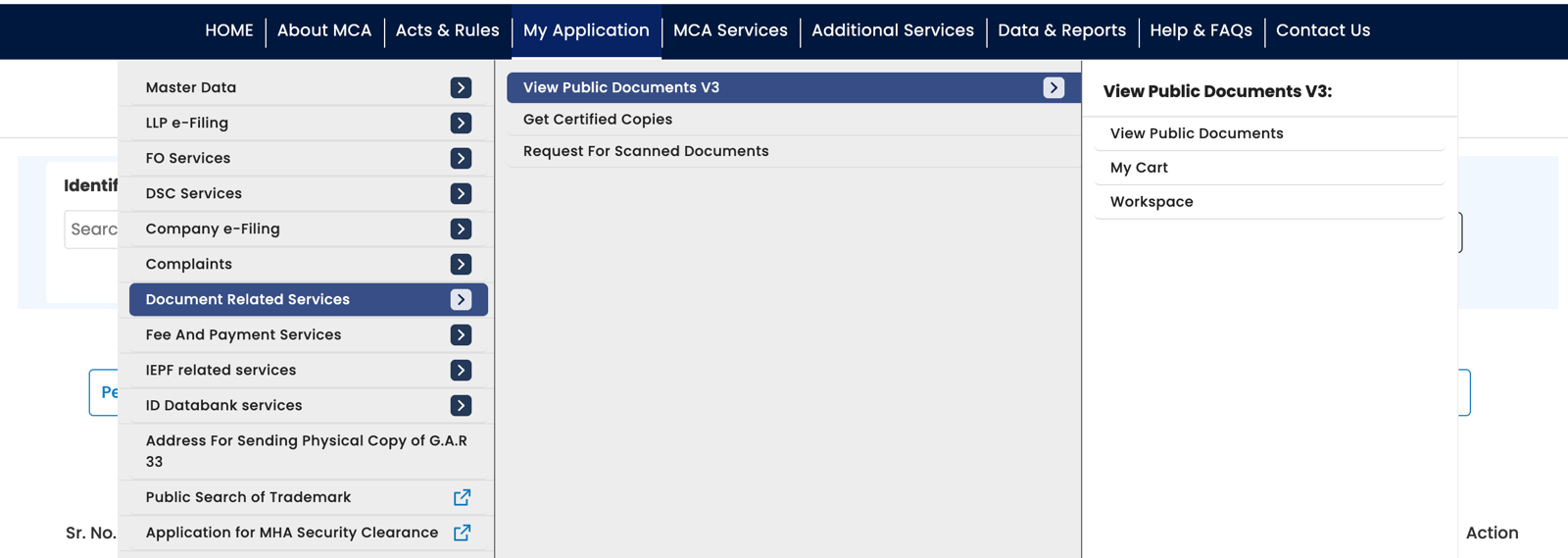
MCA’s menu: Document Related Services, then View Public Documents V3, then View Public Documents. 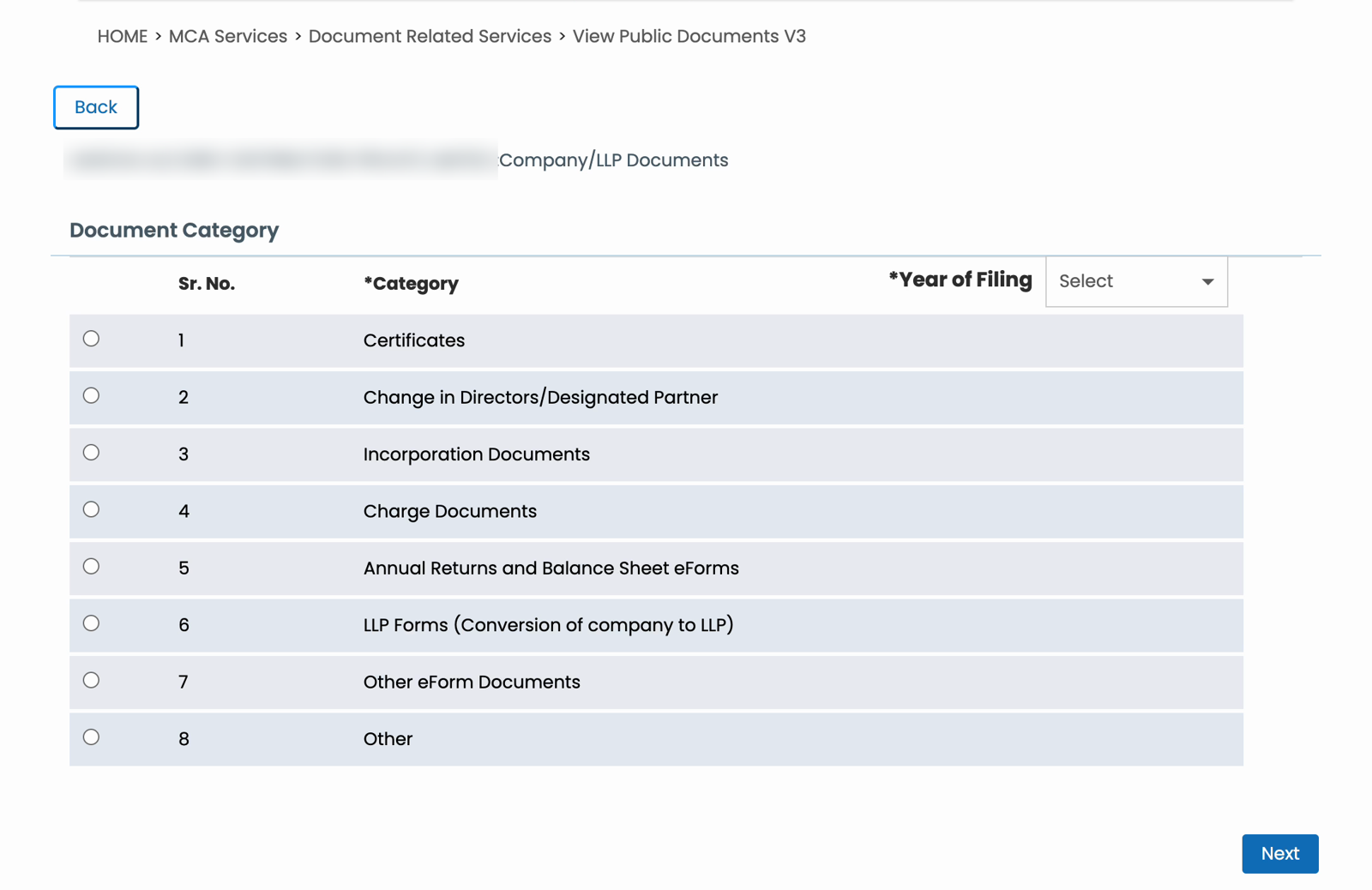
The category page: eight categories and the year of filing. Company name blurred. - Reconcile the records. Match charge IDs and directors’ DINs, distinguish event dates from filing dates, and compare each summary with its supporting documents.
- Complete and review the report. Cite sources, separate findings from explanations, list unresolved matters and date the final report.
For the portal steps, use the MCA document download guide. For interpreting security records, see how to check charges on a company.
What a search report can reveal
A search report states facts, but some facts deserve a second look. Record each one as an observation with its follow-up, not as a conclusion.
- A charge filed late. Compare the instrument date in CHG-1 with its filing date. The law allows 30 days, and up to 120 days with extra fees.
- A charge satisfied in favour of an asset reconstruction company. CHG-4 asks this directly. It usually means the lender sold the loan as a bad debt.
- A charge modified again and again. Each modification can raise the amount secured, so a rising trail shows borrowing growing.
- An open charge on a loan said to be repaid. Also read the notes to the accounts: companies must disclose charges or satisfactions not registered in time.
- The audit report flags a problem. Look for a qualified opinion, doubt about the company continuing as a going concern, or the CARO section reporting a default in repaying loans. The audit report is inside the AOC-4.
- The auditor changes often. Compare the audit firm’s name on each year’s audit report.
- Late annual filings, or no AGM. The annual return (MGT-7) says whether the AGM was held. Compare the AOC-4 and MGT-7 filing dates with the year they cover.
- Shareholders change just before the loan or deal. Compare the shareholder list in one annual return with the next, and look for recent PAS-3 allotments.
Sample observation: an open charge the company says is repaid
Fictional example: The inspected record shows Charge X securing up to ₹50 lakh, with no satisfaction date. The company says the facility has been repaid.
A useful observation would be:
Satisfaction of Charge X is not shown in the records inspected on [date]. The company states that the facility has been repaid. Obtain the lender’s confirmation and reconcile the satisfaction filing and certificate with MCA’s record.
This separates the recorded fact, the company’s explanation and the follow-up. It does not report ₹50 lakh as the outstanding loan balance.
Common mistakes to avoid
- Adding charge amounts as total debt. The maximum amount secured is not the current balance. Modifications can also cause double-counting.
- Treating old snapshots as current. Shareholding, director details and financial statements relate to particular dates.
- Calling missing search results proof of non-filing. Check the period, category and attachments before recording a conclusion.
- Using “Active” as proof of full compliance. Record the status and assess the relevant filings separately.
- Mixing financial figures. State the year, units and whether figures are standalone or consolidated. Read the financial statements and notes.
Collect the documents with ROCwork
ROCwork downloads selected years and categories from your logged-in MCA tab after you pay MCA’s fee. It checks zips, retries failed downloads and organises the files with an Excel index.
Use those files as the evidence for your review. Preparing the findings and signing the report remain separate steps.
FAQ
Can I download a ready-made ROC search report from MCA?
MCA does not provide a ready-made ROC search report. You download the company’s records from MCA and prepare the report from them. Master data, a charge index or a folder of filings is not the completed report. A bank may also require its own format and a professional it accepts to sign it.
Who can prepare and sign an ROC search report?
An ROC search report is usually prepared and signed by a practising company secretary, though chartered accountants and advocates also prepare them. ICSI lists search reports as work for practising company secretaries. The lender decides whose report it accepts, so check its format, empanelment and signing requirements before you start.
How long is an ROC search report valid?
An ROC search report has no fixed validity period. It describes the records inspected on its stated search date, and later filings can change the position. Ask the recipient how recent the search must be and whether it must be refreshed before the loan is disbursed or the transaction completes.
Does an ROC search report prove that a company has no debt?
An ROC search report does not prove that a company has no debt. Charges concern security over assets; unsecured borrowing may not appear in the charge index. Even a satisfied charge relates only to that charge. Use financial statements, lender confirmations and other relevant records to assess borrowings.
What does an ROC search report cost?
An ROC search report costs two separate things. MCA charges ₹100 per company to view and download its filed documents; the master data is free. The professional preparing the report charges a fee for the work, which depends on the scope, the company’s history and the recipient’s requirements.
Is an ROC search report the same as a CERSAI search?
An ROC search report is not the same as a CERSAI search. The ROC search covers the company’s records on MCA, including charges registered there. CERSAI is a separate central registry of security interests, searched on its own website. Lenders often ask for both, so check which searches your recipient needs.
Sources: ICSI’s guidance on search and status reports, alongside MCA document categories and downloaded filings reviewed for the related guides. ROCwork is a product of Consara Technologies Private Limited and is not affiliated with the Ministry of Corporate Affairs.