To get the balance sheet of a private limited company in India, download its financial statements from MCA’s View Public Documents service. Look for the company’s AOC-4 filing under Annual Returns and Balance Sheet eForms.
You need an MCA login and a ₹100 payment per company. You can then download the available filings for the years you need.
What is AOC-4?
AOC-4 is the form a company uses to file its financial statements with MCA. The form contains a summary; the attachments contain the full accounts.
A filing usually includes:
- Balance sheet: what the company owns and owes at the year end.
- Profit and loss statement: its revenue, expenses and profit for the year.
- Notes to accounts: details behind the figures, such as borrowings and related-party transactions.
- Auditor’s report and board’s report.
You may also find a cash flow statement. The exact set of documents varies by company and filing.
How to download a company’s balance sheet from MCA
If you do not have a login, start with how to make an MCA ID.
- Log in to mca.gov.in. Open MCA Services → Document Related Services → View Public Documents V3 → View Public Documents.
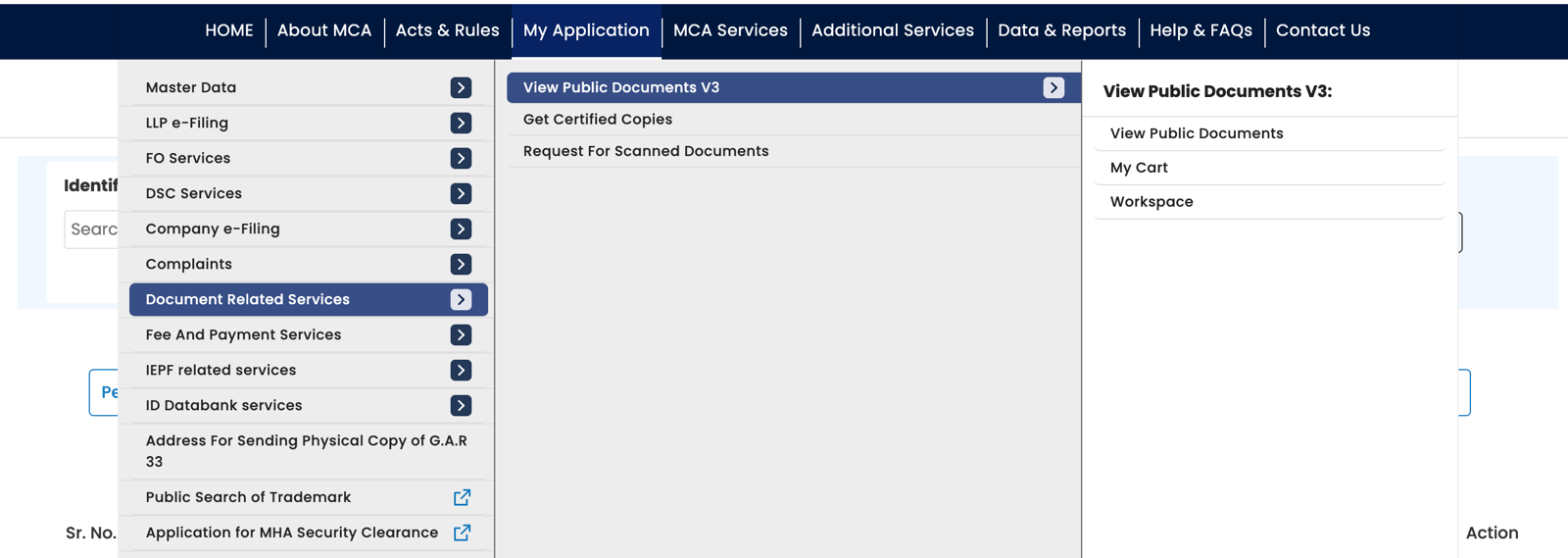
MCA’s menu: Document Related Services, then View Public Documents V3, then View Public Documents. - Find the company and pay ₹100. Search using its CIN (Corporate Identity Number), add the company, and complete the payment. It then appears in your Workspace.
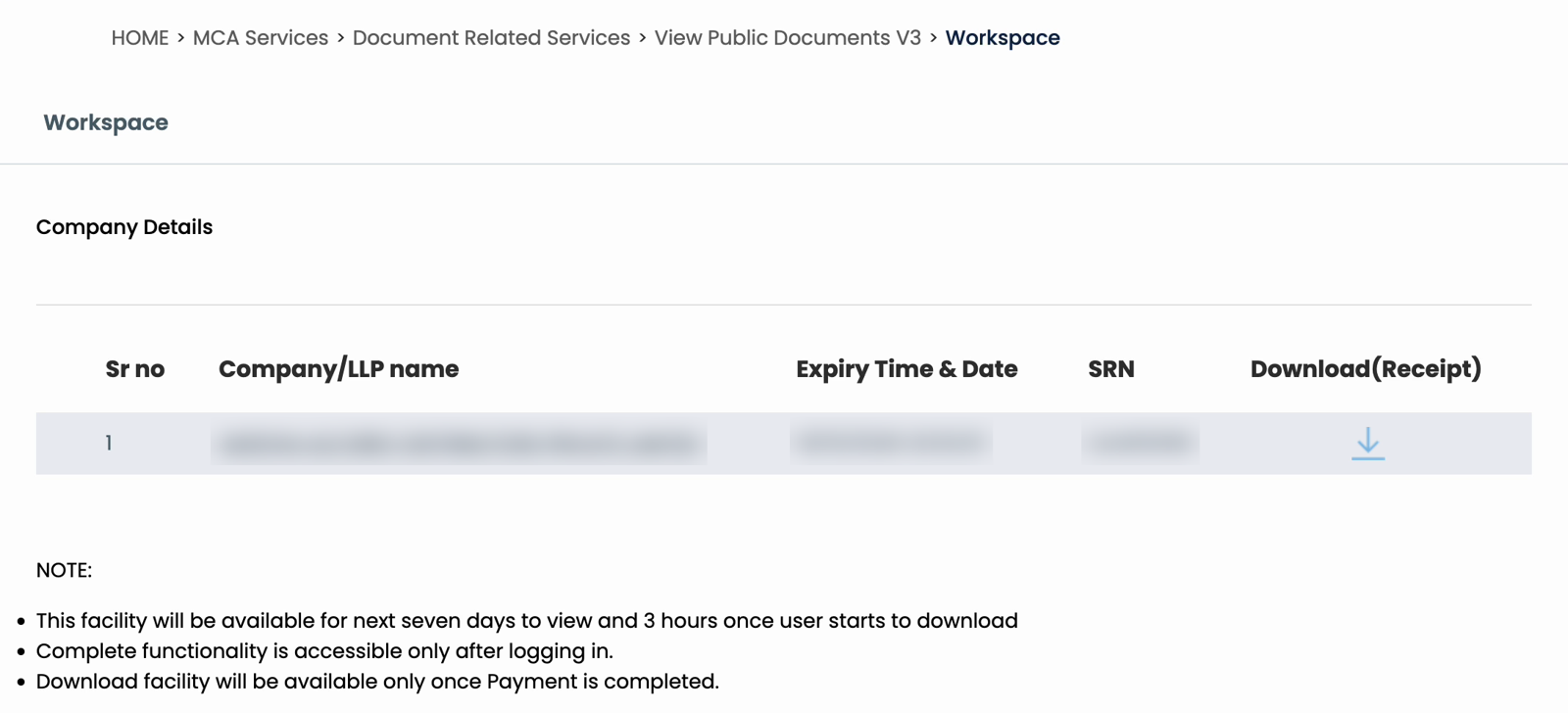
Your Workspace after paying: the company, the expiry time and the SRN. Details blurred. - Choose the years and category. Open the company, select the filing years, and choose Annual Returns and Balance Sheet eForms. Click Next.
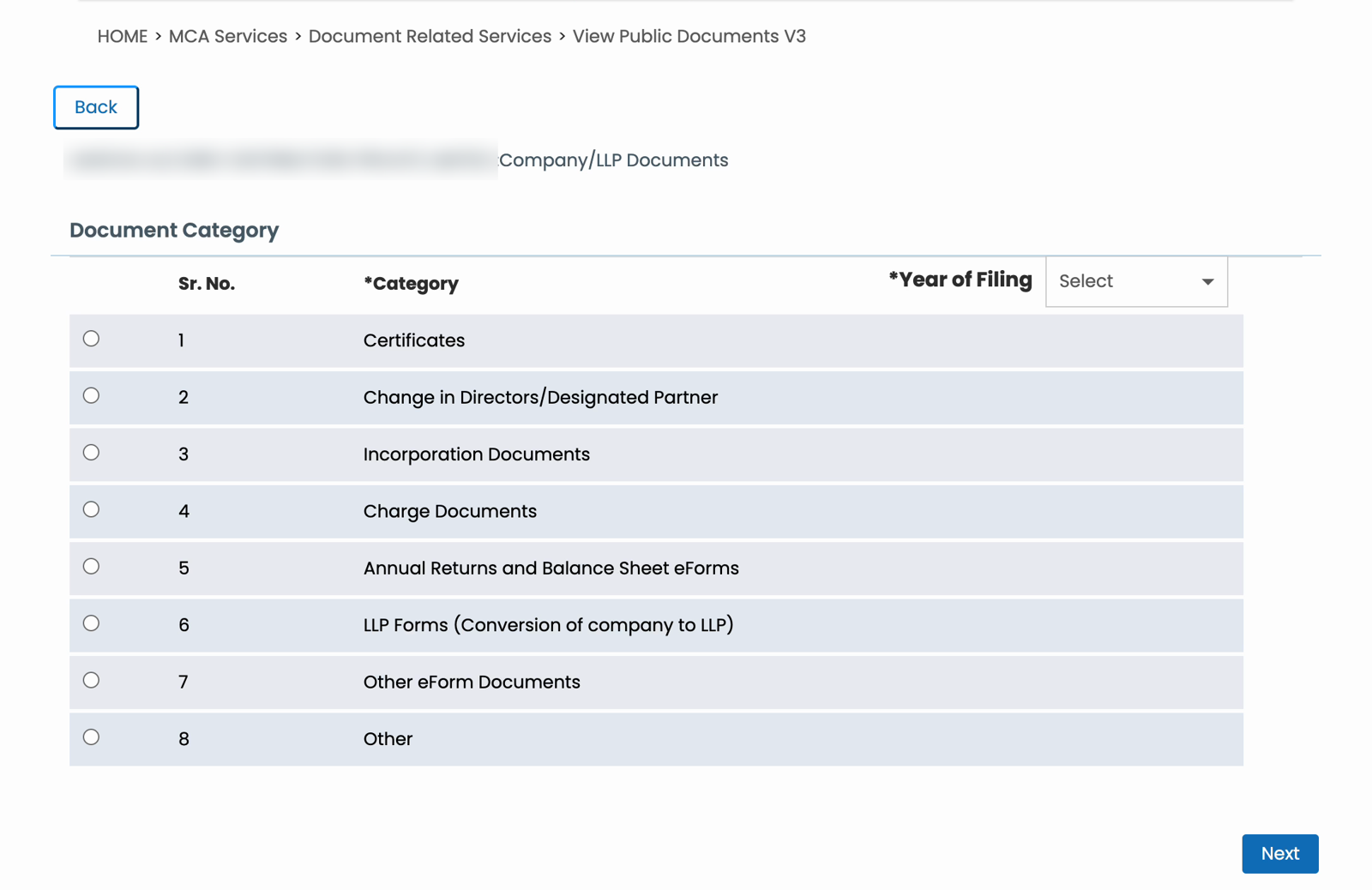
The category page. Tick Annual Returns and Balance Sheet eForms and pick the year of filing. Company name blurred. - Select the financial statements. Look for AOC-4 and its attachments. Choose up to five documents at a time. The next section explains which attachment to pick.
- Download the files. Click Download, enter the captcha and submit. MCA sends a zip. Wait for the Download button to unlock before selecting the next batch.
In our September 2026 runs, each zip took about a minute, and the Download button stayed locked for 80 seconds. Access lasted 3 hours from the first download.
For payment help and download problems, see the full MCA document download guide.
Which year and file should you choose?
Choose the filing year
MCA groups documents by the year they were filed, which can differ from the financial year they cover.
For example, one filing we checked covered FY 2025–26 (1 April 2025 to 31 March 2026) and was filed on 25 August 2026. It appears under 2026, not 2025.
If you cannot find the accounts, select the following year too, or search all available years. Once downloaded, check the financial period printed inside the statements.
Open the financial statements attachment
MCA may list the financial statements separately or include them inside the form PDF. Start with these documents:
| Filing | Attachment to look for |
|---|---|
| AOC-4 | Copy of Financial Staements duly authenticated… — MCA’s label includes this spelling mistake. |
| AOC-4 XBRL | XBRL financial statements duly authenticated… |
| Form AOC-4 or Form AOC-4(XBRL) | Open the PDF’s attachments panel if the accounts are not listed separately. |
| Older filings, such as Form 23AC | The statements may be attached inside the form PDF. |
The financial statements attachment often includes several reports in one PDF. Search within it for “Balance sheet”. If it is a scan, you may need to scroll through the pages.
Before copying figures, check the units printed above the table: rupees, lakhs or millions. Also check which column is the current year.
If you see both standalone and consolidated statements, use standalone accounts for the company itself. Consolidated accounts cover the company and its group.
If the accounts are inside the form PDF
Download the form and open its attachments panel (the paperclip icon) in desktop Adobe Acrobat Reader. Save the financial statements PDF and open it separately.
This applies to recent filings too. In the 2025–26 forms we inspected, attachments included signed accounts, board reports and XBRL .xml files. For ordinary reading, choose the accounts PDF; the XML is for software that reads XBRL data.
If an older form shows only “Please wait” in your PDF viewer, try opening it in desktop Acrobat Reader, then check the same attachments panel.
Can you get a private company’s balance sheet for free?
MCA’s free company master data can show the Date of Balance Sheet, but it does not include the full accounts. To read the filed balance sheet, use the paid View Public Documents service.
The date helps you identify the latest financial year recorded. It does not, by itself, explain why a newer balance sheet is missing.
Need several years of financial statements?
For a few documents, downloading from MCA by hand is straightforward. For several years, the five-document batches and repeated captchas take time.
ROCwork is a Chrome extension that handles those downloads from your logged-in MCA tab. After you pay MCA and open the company in your workspace, choose the years and categories you need, then press Download.
ROCwork checks the zips, retries failed downloads and sorts the documents into folders, with an Excel index to help you find each file. The index lists the documents; it does not convert the balance sheets into Excel.
For ownership details alongside the accounts, read how to download a company’s annual return.
FAQ
What is the difference between AOC-4 and AOC-4 XBRL?
AOC-4 and AOC-4 XBRL both carry a company’s financial statements. XBRL stores the figures in a tagged, machine-readable format. MCA downloads can include a readable PDF generated from that data. The form PDF may also contain the original XML and the company’s signed accounts as embedded attachments.
Why is the latest balance sheet not on MCA?
The latest balance sheet appears on MCA only after the company files Form AOC-4. Most companies hold their AGM by 30 September and must file AOC-4 within 30 days of it, so by about 30 October. Some file later and pay a late fee. Once filed, it shows up on MCA quickly.
Can I download the balance sheet from MCA in Excel?
MCA’s financial statement downloads are generally PDFs, rather than ready-made Excel sheets. If the PDF contains selectable text, you can copy the figures into a spreadsheet and check the formatting. Scanned statements need OCR or manual entry. Check the extracted numbers against the original before using them.
What is the difference between AOC-4 and MGT-7?
AOC-4 contains a company’s financial statements, including its balance sheet and profit and loss statement. MGT-7 is the annual return, with details such as shareholders, directors and share capital. Both appear under Annual Returns and Balance Sheet eForms, so check the form name before downloading.
Sources: Our own measured runs on MCA V3’s View Public Documents between 22 and 25 September 2026, and downloaded AOC-4 forms, financial statements and embedded XBRL files inspected on 5 and 15 October 2026. ROCwork is a product of Consara Technologies Private Limited and is not affiliated with the Ministry of Corporate Affairs.