To see the shareholders of a private limited company in India, download its annual return—MGT-7 or MGT-7A—from MCA, along with the shareholder list. Start with View Public Documents, pay for access to the company, and choose Annual Returns and Balance Sheet eForms.
The return helps you see who held shares at the reporting date. It does not necessarily show who owns the company today or the individuals behind a corporate shareholder.
For a listed company, there is a quicker free route: the quarterly shareholding pattern on BSE or NSE names every holder above 1%.
What is MGT-7, the annual return?
An annual return records a company’s ownership, share capital and management details for a financial year. It also reports information such as share transfers and meetings during that period.
You may find these forms:
| Form | What it is |
|---|---|
| MGT-7 | The annual return for companies other than OPCs and small companies. |
| MGT-7A | The abridged annual return for one person companies (OPCs) and small companies, introduced for FY 2020–21 onward. |
| Form 20B | An older annual-return form for companies with share capital. Check the dates inside it rather than treating it as a modern MGT-7. |
For ownership research, the important distinction is between the shareholding summary in the form and the list of individual holders. Download both where available.
What can you learn from an annual return?
- Share capital: the classes of shares and the authorised, issued and paid-up capital reported.
- Shareholding: category-level holdings in the form and holder-level details in the accompanying list.
- Management: directors and, where applicable, key managerial personnel and changes during the year.
- Company activity: business activities, meetings and other disclosures included in that version of the form.
For example, comparing two returns can show that a shareholder’s holding increased between reporting dates. It does not, on its own, tell you the exact date or reason for every change.
MGT-7A contains fewer details than MGT-7. Use the sections actually present in the downloaded form rather than expecting every field to match.
How to download MGT-7 from the MCA portal
You need an MCA login and the company’s CIN (Corporate Identity Number). Access costs ₹100 per company.
- Log in to mca.gov.in. Open MCA Services → Document Related Services → View Public Documents V3 → View Public Documents.
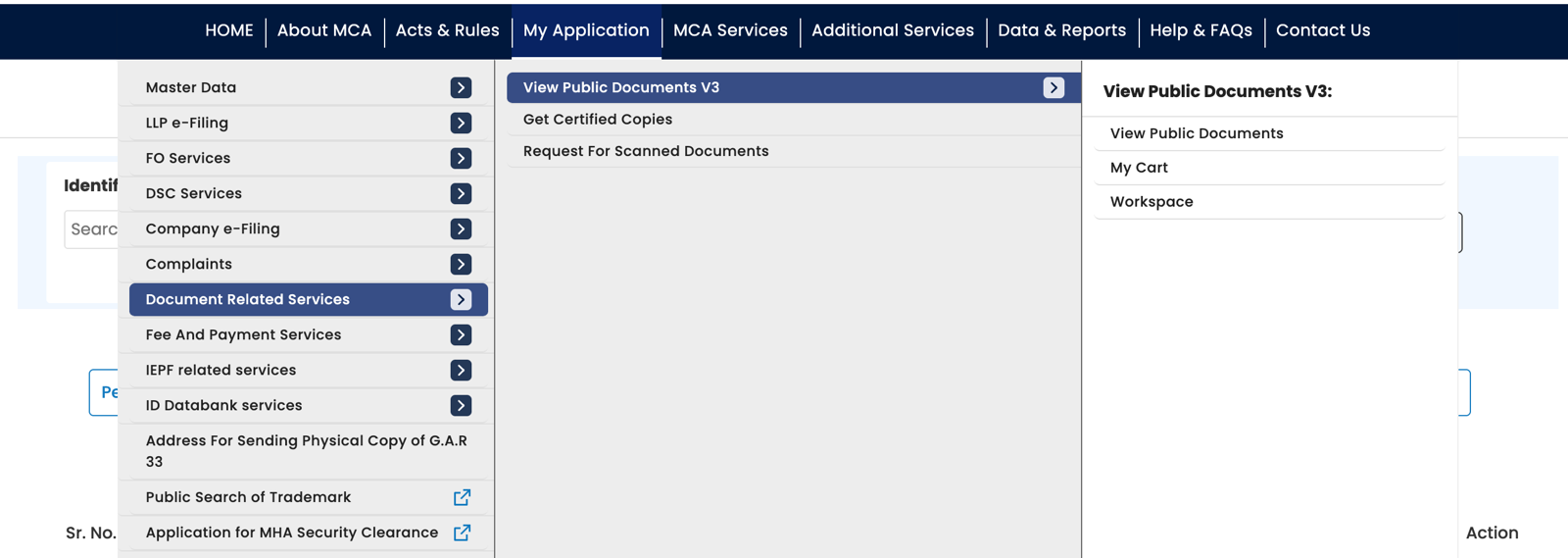
MCA’s menu: Document Related Services, then View Public Documents V3, then View Public Documents. - Find the company and pay for access. Search by CIN, add the company and complete payment. It then appears in your Workspace.
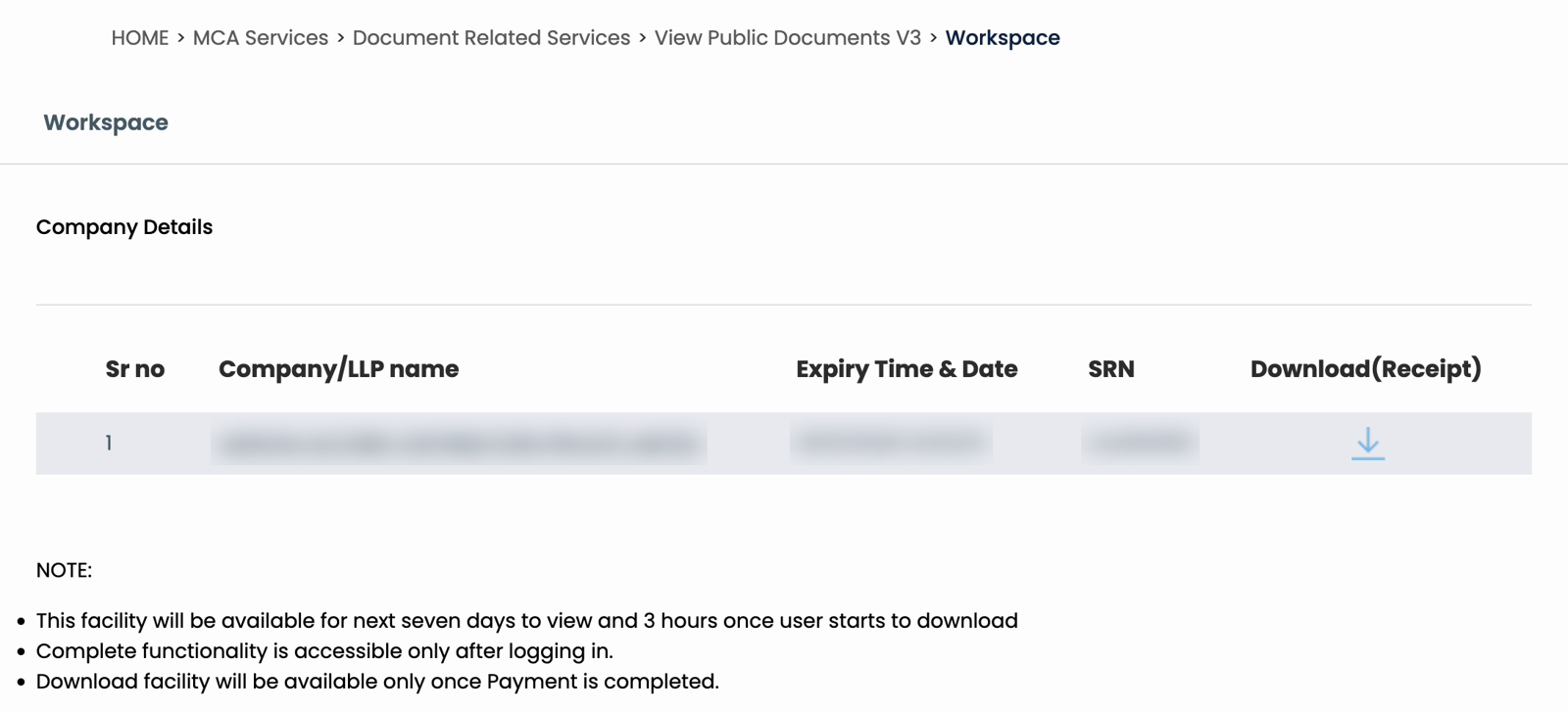
Your Workspace after paying: the company, the expiry time and the SRN. Details blurred. - Choose the years and category. Open the company and select Annual Returns and Balance Sheet eForms. Select all available years if you are unsure when the return was filed.
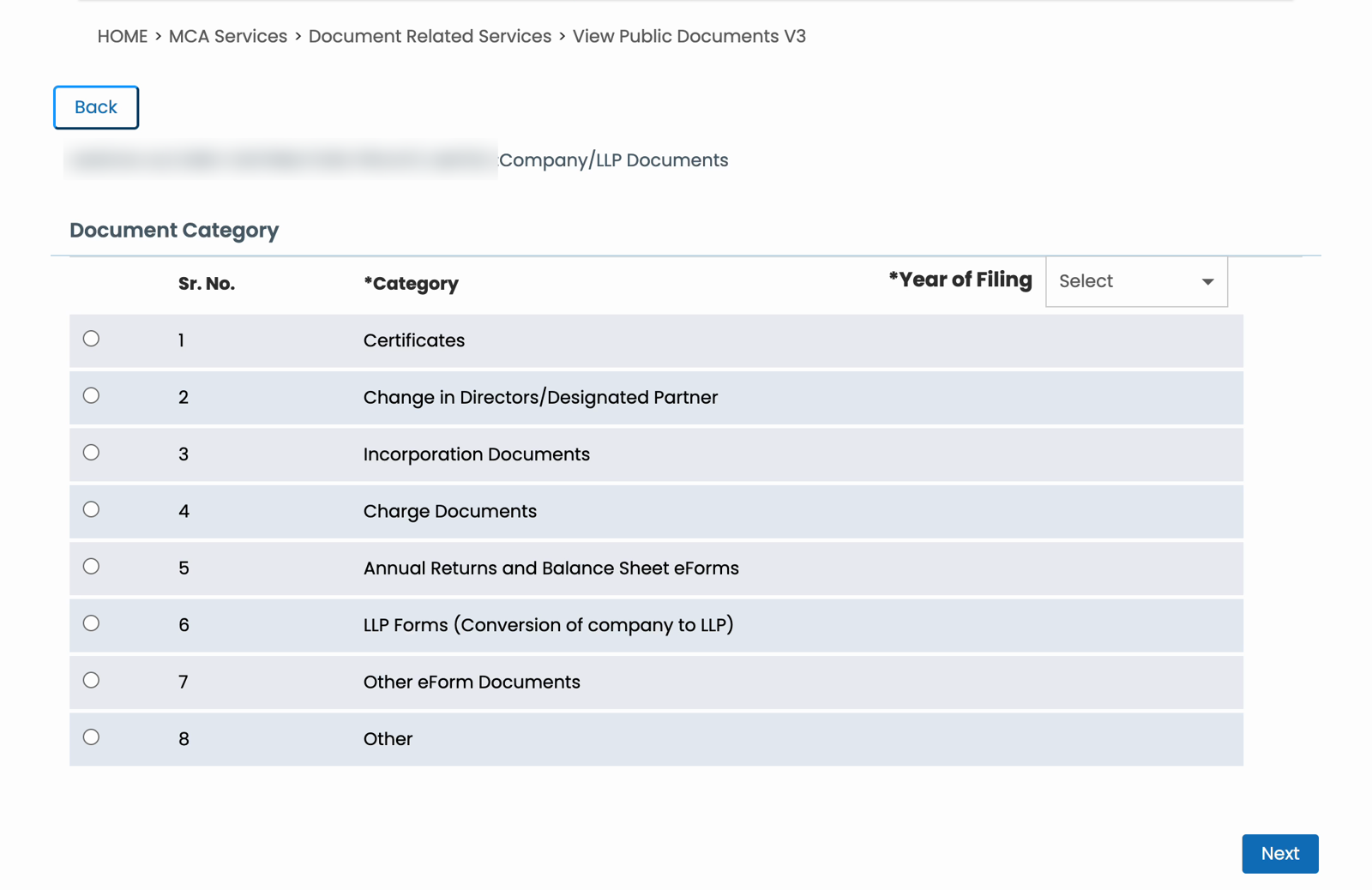
The category page. Annual Returns and Balance Sheet eForms is number 5. Company name blurred. - Select the return and shareholder list. Look for MGT-7, MGT-7A, or an older Form 20B, plus attachments labelled List of share holders, debenture holders. Select up to five documents per batch.
- Download and extract the zip. Click Download, enter the captcha and submit. Wait for the button to unlock before starting another batch.
Each zip takes about a minute, and the Download button stays locked for about 80 seconds between batches. Access lasts 3 hours from the first download. For payment and download troubleshooting, use the full MCA document download guide.
Which year and attachment should you choose?
Check the reporting period inside the return
Search by filing year, then read the financial-year dates inside the document. The filing date and the period covered are different.
For example, the return for FY 2025–26 (1 April 2025 to 31 March 2026) is due within 60 days of the AGM, which for most companies means by late November 2026. It appears under 2026. A return filed late appears under a later year, so check later years too.
Also check whether the form is marked Original or Revised. Two files for the same financial year may be different versions of that return.
Look for the shareholder list in both places
The list can be a separate download or an attachment inside the return PDF:
- Separate file: the list can come as an Excel
.xlsmfile next to the MGT-7, labelled List of share holders, debenture holders. - Embedded attachment: the list can be a PDF inside the MGT-7. Open the attachments panel in desktop Adobe Acrobat Reader and save the list separately.
The form’s attachment section can help you identify the filename. Do not assume that downloading the form alone gives you the full list—or that every attachment is a PDF.
For older Form 20B returns, check the attached annual return and its schedules. Those lists may state holdings at the AGM date, rather than at 31 March.
How to read the shareholding without overinterpreting it
Start with the date of the list, the holder’s name, the class of security and the number held. Compare like-for-like classes and dates when reading several years.
Keep these limits in mind:
- It is a dated record. Later transfers or allotments may have changed the holdings.
- Share counts are not automatically voting percentages. Different classes can carry different rights.
- A registered holder is not always the ultimate owner. A company or nominee may appear in the list; the return alone does not trace the person behind that holding.
For the company’s accounts, see how to get a private company’s financial statements.
More detail on shares issued in a year: PAS-3
If you want more detail on the shares a company issued in a particular year, look for Form PAS-3, the return of allotment. A company files one each time it allots new shares.
Its attachments include:
- List of allottees: who received the new shares and how many each.
- Valuation report: the valuer’s report behind the issue price, where one was filed.
On MCA, PAS-3 is under Other eForm Documents. The same ₹100 payment covers it; just select that category and the year.
To read a PAS-3 in detail, see how to know who invested in a private company.
Download several years with ROCwork
ROCwork downloads selected years and categories from your logged-in MCA tab after you pay MCA’s fee. It checks the zips, retries failed downloads and sorts the files into folders with an Excel index.
The index helps you find the documents. You still need to inspect the returns and attachments to understand the holdings they report.
FAQ
Does MGT-7 show every shareholder’s name?
MGT-7 contains shareholding information, but the holder-by-holder list may be supplied as a separate attachment rather than printed in the form. Check both the document list on MCA and attachments inside the downloaded PDF. Whether you have a complete list depends on the actual filing and files available.
What is the difference between MGT-7 and MGT-7A?
MGT-7 is the annual return for companies other than one person companies and small companies. Those companies use the shorter MGT-7A, introduced for FY 2020–21 onward. Both are relevant to shareholding research, but their sections differ. Check the return and its accompanying holder list together.
Can I download an annual return from MCA for free?
MCA does not offer annual returns for free. Downloading MGT-7 through View Public Documents costs ₹100 per company, and that one payment covers all of the company’s available filings. A company may also publish its annual return on its own website; check that the copy covers the year you need.
Does an annual return show the company’s owners today?
An annual return reports holdings for a stated date, so it should not be treated as a live ownership register. Later share transfers or issues can change the position. It also does not necessarily identify the individuals behind corporate or nominee shareholders. Check the reporting date before drawing conclusions.
Why is the latest annual return missing on MCA?
A company files MGT-7 within 60 days of its AGM, so the return for a year ending 31 March usually appears on MCA by late November. Some companies file late. Search later filing years and check the form names and attachments. An unsuccessful search alone does not prove the company failed to file.
Sources: Downloaded MGT-7 and PAS-3 forms and their attachments; MCA’s PAS-3 instruction kit (19 Nov 2025); our own downloads from MCA V3’s View Public Documents; ICAI’s announcement on MGT-7 and MGT-7A; and the Companies Act on India Code. ROCwork is a product of Consara Technologies Private Limited and is not affiliated with the Ministry of Corporate Affairs.