To download a company’s MOA and AOA from MCA, log in to mca.gov.in, open View Public Documents, pay ₹100 for the company, and choose Incorporation Documents. Look for Memorandum of Association, Articles of Association, INC-33 or INC-34.
If you need the current documents, search all available years and check Other eForm Documents for amendments too. The first copy you find may not be the latest.
What are MOA and AOA?
The Memorandum of Association (MOA) describes the company’s identity and stated business activities. The Articles of Association (AOA) set out its internal rules. Together, they help you understand the company beyond its name and registration details.
What does the MOA tell you?
The MOA is organised into clauses. For a company limited by shares, look for:
- Name and registered-office state: the company’s name and the state in which its registered office is situated.
- Objects: the business activities the company was set up to carry on. This is the section to read when checking what business the company describes itself as doing.
- Members’ liability: the clause describing the limits of members’ liability.
- Capital: the authorised share capital and how it is divided into shares.
For example, if you are reviewing a manufacturer that now offers consulting services, the objects clause helps you check whether consulting is included in its stated activities. It does not tell you how much revenue the company earns from that activity.
What does the AOA tell you?
The AOA explains how decisions and ownership matters are handled within the company. Depending on the articles, it can cover:
- Shares and transfers: rules for issuing or transferring shares and any restrictions on transfers.
- Meetings and voting: how shareholder and board decisions are made.
- Directors: their appointment, powers and responsibilities.
- Shareholder rights: rights attached to shares and any special provisions written into the articles.
For example, before buying shares in a private company, you might read the AOA to see whether an existing shareholder must first be offered those shares or whether a transfer needs approval. Read the actual clause: the rules can differ between companies.
How to download MOA and AOA from MCA
You need an MCA login, the company’s CIN (Corporate Identity Number) and ₹100 for access to its public documents. If you do not have a login, start with how to make an MCA ID.
- Log in to mca.gov.in. Open MCA Services → Document Related Services → View Public Documents V3 → View Public Documents.
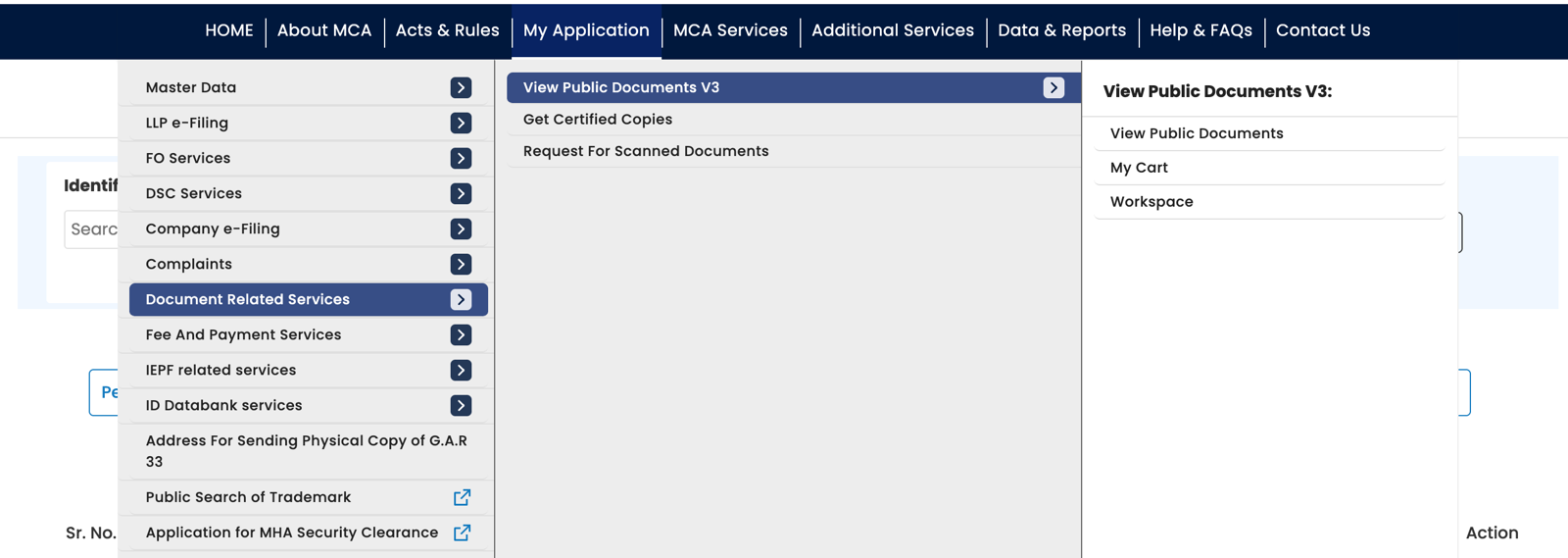
MCA’s menu: Document Related Services, then View Public Documents V3, then View Public Documents. - Find the company and pay ₹100. Search by CIN, add the company and complete the payment. It then appears in your Workspace.
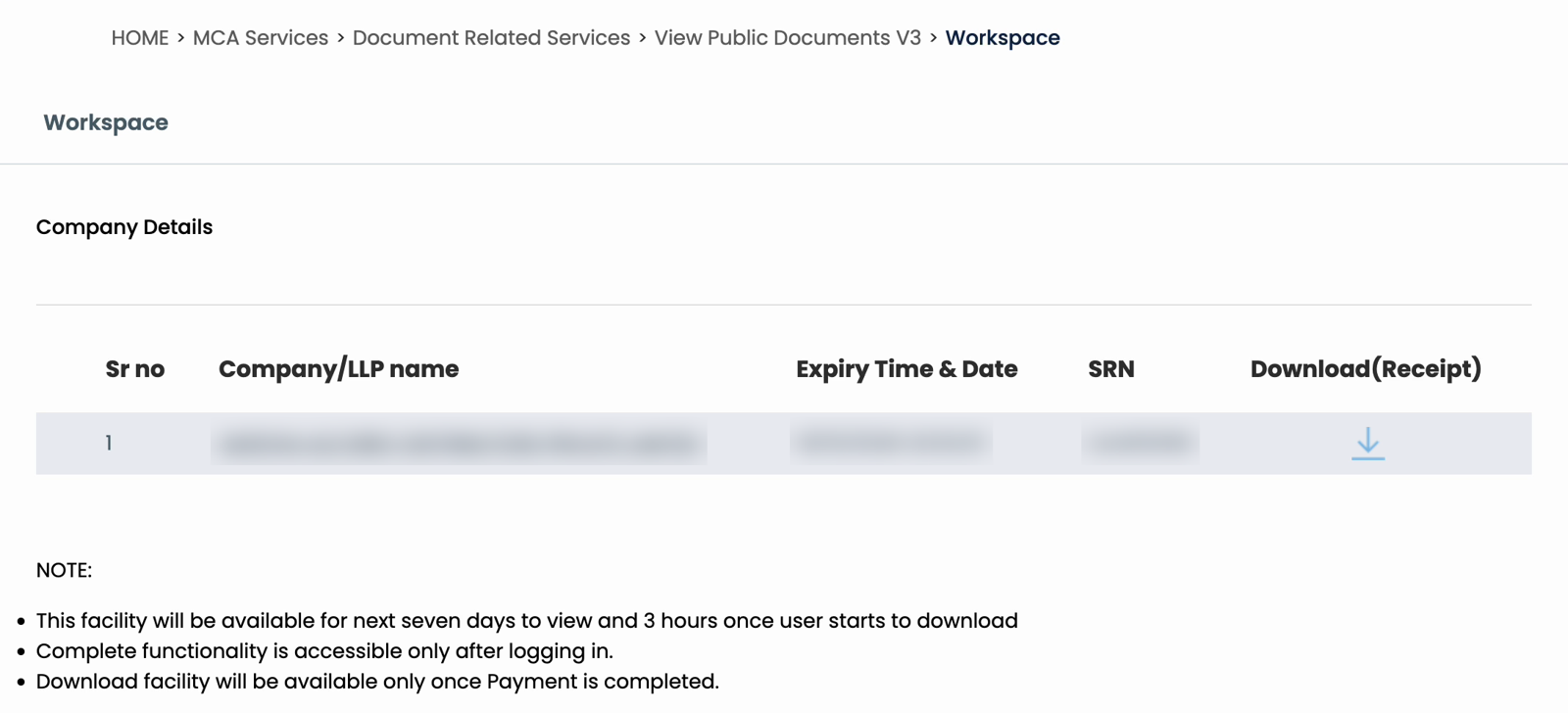
Your Workspace after paying: the company, the expiry time and the SRN. Details blurred. - Choose the years and category. Open the company, select all available years and choose Incorporation Documents. Click Next.
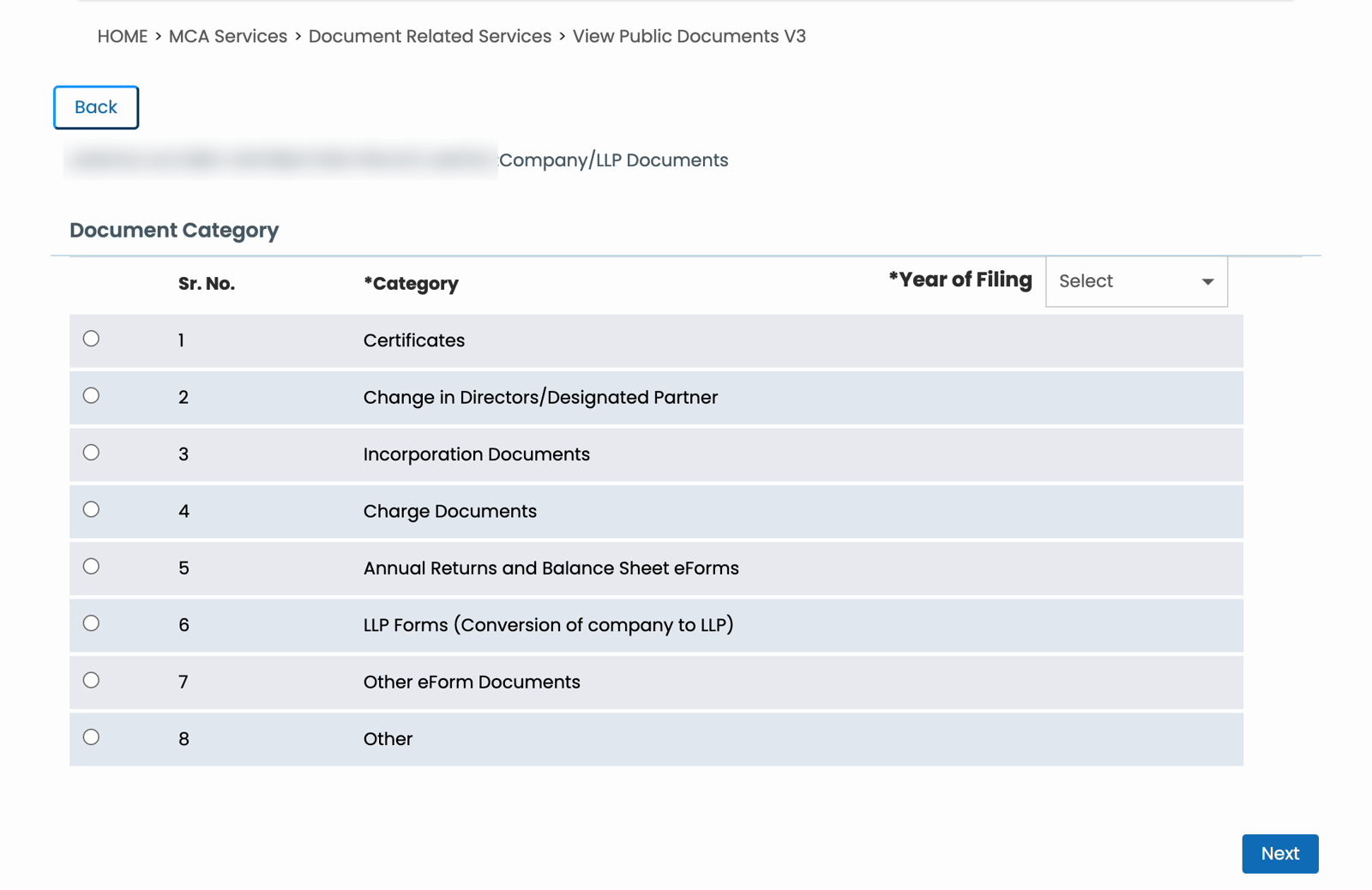
The category page. Incorporation Documents is number 3. Company name blurred. - Select the MOA and AOA files. Look for the document names or forms INC-33 and INC-34. You can select up to five documents at a time.
- Download. Click Download, enter the captcha and submit. Extract the files from the zip. Wait for the Download button to unlock before downloading another batch.
- Check for amendments. Open Other eForm Documents across all available years. Look for altered MOA/AOA attachments and the related filings, especially MGT-14.
Each zip takes about a minute, and the Download button stays locked for about 80 seconds between batches. One payment covers every category and year for 3 hours from the first download.
For payment issues or failed downloads, see the full MCA document download guide.
Which files should you open?
MCA’s labels vary. These are the names to look for:
| Document name | What it contains |
|---|---|
| Memorandum of association | A copy of the MOA. |
| Articles of association | A copy of the AOA. |
| INC-33 eMOA | The electronic MOA form. |
| INC-34 e-AOA | The electronic AOA form. |
| Altered memorandum/articles of association | An amended copy, which we found among MGT-14 attachments. |
Check inside the form PDF too. Some INC-33 and INC-34 files we inspected contained a separate MOA or AOA attachment. Open the PDF’s attachments panel—the paperclip icon in desktop Adobe Acrobat Reader—and save that copy.
Some documents have searchable text; others are scans. A scan may still contain the complete document even though searching or copying text does not work.
How to find the latest MOA and AOA
Do not assume “Incorporation Documents” contains only the originals. It can hold the original MOA and AOA next to INC-33 and INC-34 filings made many years later.
To check the versions available:
- Review the newest MOA and AOA filings in Incorporation Documents. Open them and check the dates and contents, including embedded attachments.
- Check Other eForm Documents for changes. MGT-14 attachments may include an altered MOA or AOA and the resolution explaining the change. Not every MGT-14 concerns these documents.
- Compare the documents. A later filing may contain a complete revised copy or relate to a specific change. Read the supporting resolution before treating a copy as current.
You do not always need to assemble the original plus every amendment: a later filing may already contain a complete revised document. But the newest filename alone does not establish that it includes every change.
Download the documents together with ROCwork
If you need several versions, downloading five files at a time can become repetitive.
ROCwork downloads the selected years and categories from your logged-in MCA tab after you pay MCA’s fee. It checks the zips, retries failed downloads and sorts the files into folders, with an Excel index to help you locate them.
You still need to read the documents and resolutions to decide which version you need.
FAQ
What is the difference between MOA and AOA?
The MOA describes a company’s identity, stated business objects, liability and capital. The AOA sets out internal rules, such as how shares can be transferred and how meetings and voting work. Read the MOA for the company’s stated scope and the AOA for its governance arrangements.
Can I download MOA and AOA from MCA for free?
MCA does not offer a company’s MOA and AOA for free. Downloading them through View Public Documents costs ₹100 per company, and you need an MCA login. That one payment covers all of the company’s available filings, not just the MOA and AOA.
What are e-MOA and e-AOA?
The e-MOA and e-AOA are electronic forms of the Memorandum and Articles of Association, labelled INC-33 and INC-34. You may encounter these names when looking for SPICe+ incorporation documents. We also found later-dated versions for older companies, so search beyond the year of incorporation.
Is the MOA or AOA downloaded from MCA the latest version?
An MOA or AOA downloaded from MCA is a filed copy, but it is not automatically the latest version. Search all available years in Incorporation Documents and check related amendments in Other eForm Documents. Compare the dates, contents and supporting resolutions before relying on a copy as current.
Why can’t I find a company’s MOA or AOA?
A company’s MOA or AOA may be listed under a different filing year or attached inside a form PDF. Search all available years, check both Incorporation Documents and Other eForm Documents, and inspect embedded attachments. An unsuccessful search alone does not establish that the document was never filed.
Sources: Our own downloads from MCA V3’s View Public Documents, and the MOA, AOA, INC-33, INC-34 and MGT-14 files in them. ROCwork is a product of Consara Technologies Private Limited and is not affiliated with the Ministry of Corporate Affairs.